


Wondershare UniConverter (Wondershare Video Converter Ultimate for Mac) is a complete video toolbox that lets you convert, edit, enhance, download, burn, organize, capture, and watch video files. Convert videos to and from virtually any video format out there, with a 30X faster conversion speed. You can customize home movies through advanced editing features and get professional-looking works in minutes.
- Features
- Screenshots
- Whats new?
>>> Powerful Video/Audio Conversion Feature
- Convert any video/audio file to MP4, MOV, AVI, MKV, and 1000+ other formats.
- Convert video to preset Apple/Huawei/Google devices, TV, or game console for easy playback.
- Convert video to iMovie, Final Cut Pro, iDVD, or ProRes for further editing.
- Support video input directly from your iOS/Android device, Camcorder, and DVD file.
- High-Speed Conversion mode converts files at 30X the speed of contemporaries.
- Batch converts multiple files to one or different formats at one time.
- Extract audio track from a video file in high fidelity.
- Convert HD video without any quality loss.
>>> One-Click Video Compressor Mac
- Enter your desired file size and compress the video in one click.
- Adjust the video resolution, bitrate, and output format to reduce video size on Mac.
- Preview the compressed video to check output video quality beforehand.
>>> Best DVD Burner
- Burn any video to a DVD, DVD folder, or ISO files with free stylish DVD templates
- Numerous free stylish DVD templates to make your DVD unique.
- Rip DVD movies to video in MP4, MPG, WMV, 3GP, FLV, and over 1000 formats.
>>> Versatile Video/Photo Editor Mac
- Crop, rotate videos or photos to your liking.
- Add text or an image watermark for copyright protection.
- Add subtitles to video for better understanding.
- Trim video clips and merge them flexibly, frame by frame.
- Apply effects or add filters to videos or pictures.
>>> Multi-Function Video Toolbox
- GIF Maker: Create animated GIFs from videos or pictures.
- Image Converter: Convert images to popular formats like PNG, JPEG, TIFF, etc.
- Screen Recorder: Record all desktop activities with voice.
- CD Burner: Burn M4A, FLAC, MP3, and any music file to a CD.
- CD Converter: Extract CD to WAV, MP3, and M4A format.
- Fix Media Metadata: Auto-fix and edit metadata at will.
- Cast Video to TV: Cast videos to TV as a media server.
>>> Simple-to-Use Video Converter
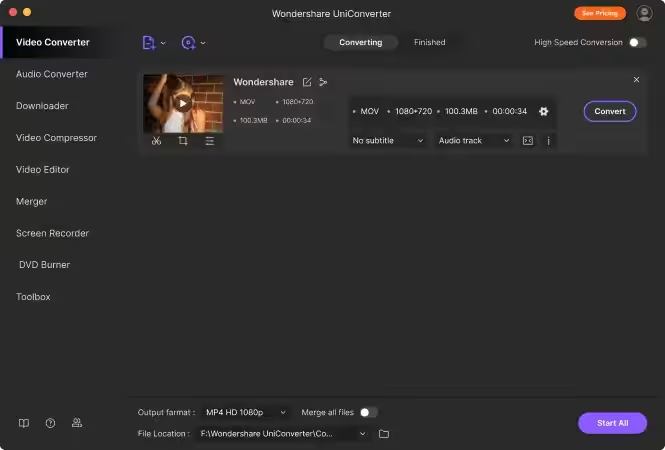
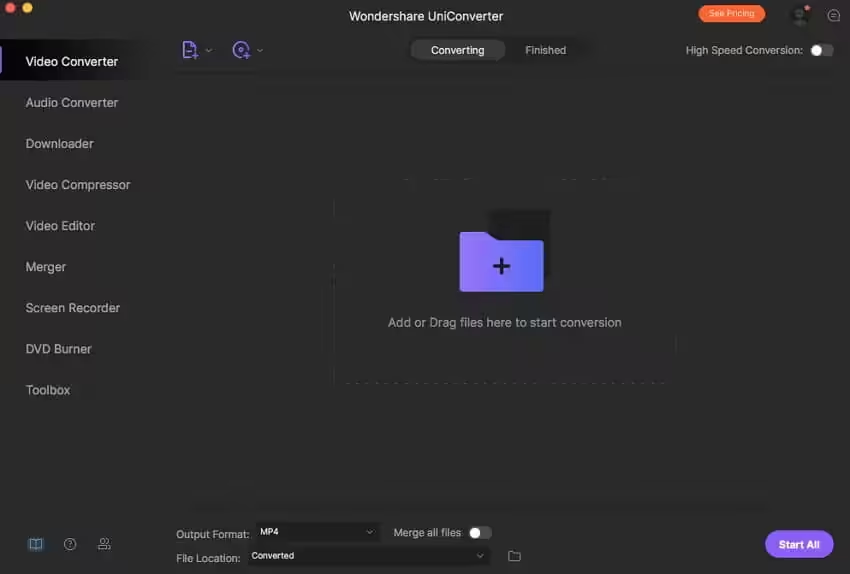
- Intuitive and user-friendly interface.
- Add files to the iTunes library automatically after conversion.
- Add videos in an easy drag-and-drop way.
- Customize the output folder to save output files.

-
Added:
- Picture-in-picture recording and webcam recording feature
- Pause option for recording feature
- The light theme for the program interface
- Option to trigger feedback for abnormal circumstances
- Compatibility for
Other:
- Optimized UI
- Fixed some bugs
- Added compatibility for ARM





Looking for WonderShare DemoCreator. Could you please upload. Thanks.
INTEL DON’T WORK
Is there a Demo Creator Hack for WonderShare products?
There is a CONSTANT popup asking me for chrome keychain data and says deny / always / allow but i don’t want this app to have all all my keychain data and send it to china to hack me! Any suggestions? how i can i stop this popup after every single time i want tot download something?
Do you have the newest version?
For me when converting a mkv file UniConverter more often than not causes a delay in the sound track. Making it useless.
It closes
A mí me sale que la versión de Wondershare 15 no es combatible con mi Mac
it says the same to me too, macOS Ventura 13.6
Hello. Why two versions of Wondershare 15 ? What’s ARM version?
ARM is Apple silicon.
Thaks Lingki. Then that’s the right version to me!!!
I downloaded and then used the terminal code and can open the app. I haven’t used it yet. I am asked to log in and then enter a product key. Is there a “key” for me to enter to unlock all of the features?
why you sharing bad stuff.
I noticed this in the last year it wants to use chrome keychain data – i dont’ even use chrome! I searched all over the net and there is no fix. Is this some sort of spyware built into this crack?
It ask for password to access keychain.
I don’t want to give any passwords of my system to such sofzware.
Is it need to do so ?
It’s only Intel Binary, no Apple silicon binary in any TNT version.
It ask for password to access keychain.
I don’t want to give any passwords of my system to such sofzware.
Is it need to do so ?
Not working
For anyone who can’t run the app after copying the app into the Applications folder, open terminal, copy this in and run:
`sudo xattr -cr /Applications/Wondershare\ UniConverter\ 13.app`
it works. thanks.
in terminal you must add exactly:
sudo xattr -cr /Applications/Wondershare\ UniConverter\ 14.app
and not
sudo xattr -cr /Applications/Wondershare\ UniConverter\ 13.app ( like somebody said)
than work…
this worked for me! thanks so much!
It says the file is damaged when you open it
You should try this: https://www.youtube.com/watch?v=lIsYMgagJz4
works without any issue ,, it could be the gatekeeper that’s preventing you from accessing the file
How do i send screenshot, i just downloaded pdf expert worked beautiful. Maybe its because TNT image instead of hcio something. Change file to TNT better.
No still doesnt work, ive turned on allow download apps everywhere. This is on mac os catalina. Other apps work execpt this one for some reason.
Can you please send us a screenshot the error?
ive done that doesnt work, just re update the file.
The new version updated yesterday, you can try it 🙂
It says this, happened last time to another the app and the guy fixed it.
“Wondershare UniConverter” is damaged and can’t be opened. You should move it to the Bin. Maybe something wrong in the file.
Please try this: https://haxmac.to/how-can-i-fix-damaged-app-message-on-macos-mojave/
Not working link is broken or file is damaged
What’s the matter, File damaged or link brocken?
file damaged doesnt open
Please send a screenshot
It says move to trash when opening