


CrossOver Mac is the easiest way to run Microsoft Windows software on your Mac without buying a Windows license, rebooting, or using a virtual machine. CrossOver Mac makes it easy to launch Windows programs natively from the dock. CrossOver Mac also integrates macOS functionality, like cross-platform copy & paste, and shared file systems for your Windows applications.
- Video
- Features
- Screenshots
- Whats new?
- Run Windows Software Without Rebooting: Once CrossOver is installed, install and launch your Windows programs as you would any Mac application. You get access to your favorite Windows programs with ease. No booting required or launching a virtual machine. No having to copy files from one file system to another. CrossOver runs directly on your Mac, and so does your Windows software.
- One-Click Installation: Our CrossTie technology is a major step forward for CrossOver users because it makes installing Windows applications drop-dead simple. Just clicking the “Install” button in CrossOver tells CrossOver to take care of the rest. You can do the same thing from our massive Compatibility Center, which has thousands of applications with CrossTie installers. Relax, and let CrossOver do the work.
- Software Runs at Native Speed: CrossOver runs natively on your Mac. Which means you don’t have to run a copy of Windows. This means you’re not paying the RAM and CPU penalty for two operating systems running at the same time. This means no bogged down, choppy performance. If you need native speed, CrossOver is the better choice.
- Seamlessly Integrates with Your Desktop Environment: Since CrossOver is running on your native Mac file system, there’s no need to move files back and forth between a Windows partition and OS X. Everything’s in one place, right where you need it. Seamlessly Cut & Paste between Windows documents and Mac documents. Launch your Windows programs from the dock. Your Windows programs behave like native Mac applications.
- Bottles: Bottles are a unique feature of CrossOver that allows separate Windows environments (XP, Win7, etc.) to be packaged and self-contained with your favorite programs. Bottles are really useful, because they let you easily backup your software, and move it from machine to machine. They also ensure that you get the right version of Windows for your application’s needs. It’s like having several different Windows machines operating together on your computer.
- Native Apple Silicon improvements: Expanded support and performance tuning for M1/M2/M3-based Macs, reducing reliance on Rosetta and improving stability for many apps and games.
- Updated Wine base: Based on a newer Wine upstream, bringing many bug fixes and improved Windows API compatibility.
- Graphics and gaming fixes: Improved DirectX translation and Vulkan/Metal backend integration, resulting in better frame rates and fewer graphical glitches for supported games.
- Installer and UI refinements: Cleaner bottler management, easier overrides for libraries and runtimes, and improved error reporting to diagnose app issues faster.
- 64-bit Windows app support: Broader and more reliable support for running 64-bit Windows applications on macOS.
- Dependency management: Improved handling of common Windows runtimes (Visual C++ redistributables, .NET) with more reliable automated installation where possible.
- Security and packaging updates: Better sandboxing for bottles and improved signing/packaging for macOS distribution.




HOW TO CRACK CROSSOVER:
1 – Right click Crossover.app
2 – Click: Show package contents -> Contents -> Resources
3 – Copy all files from croslic folder.
4 – Run license.tool and just press enter when password is required.
Done!
1 tip: when password is required you should type your admin password and press enter – process will complete correctly
What’s an admin password?
non trovo nessuna cartella croslic. ????
It worked beautifully!
For those having problems with macOS reporting a corrupted application, paste the following command into the terminal: “xattr -d com.apple.quarantine ” (yes, you need the space at the end). Don’t press enter yet. Find the CrossOver application in Launchpad, click and drag it into the terminal (this will identify the app’s path). Click in the terminal area, press the right arrow key, and press enter. A message should appear after this command, and that’s it. If the message doesn’t appear, repeat the process. After that, if the app doesn’t open, check if you need to authorize the app in your Mac’s Privacy and Security settings. If it still doesn’t work, right-click on the app, select Show Package Contents, and locate the app’s executable file within the folders. Try repeating the process by dragging this executable into the terminal.
can i get ur contact bro ?
I got this error :
I copied the “croslic” in desktop:
username@Administrators-MacBook-Pro croslic % pwd
/Users/rageshantonyd/Desktop/croslic
username@Administrators-MacBook-Pro croslic % ls
libcxsetup-v3.py license.tool
username@Administrators-MacBook-Pro croslic % sudo ./license.tool
writing RSA key
cp: ./libcxsetup-v3.py: No such file or directory
username@Administrators-MacBook-Pro croslic %
If you’re having issues with crack i.e , still trial after running the crack, replace the contents of license.tool by
then run it again
#!/bin/sh -e
if [ ! -d /Applications/CrossOver.app ]; then
echo “Please install CrossOver!”
exit 1
fi
# Fix license
cd ~/Library/Preferences/
openssl genrsa -out key.pem 2048
openssl rsa -in key.pem -outform PEM -pubout -out public.pem
sudo mv public.pem /Applications/CrossOver.app/Contents/SharedSupport/CrossOver/share/crossover/data/tie.pub
sudo rm -f com.codeweavers.CrossOver.license com.codeweavers.CrossOver.sha256
printf “[crossmac]\ncustomer=user\nemail=user@apple.com\nexpires=2030/01/01\n[license]\nid=a4xdUZD2bWB00tQI” > com.codeweavers.CrossOver.license
openssl dgst -sha256 -sign key.pem -out com.codeweavers.CrossOver.sha256 com.codeweavers.CrossOver.license
rm key.pem
# You have to go back to the tool dir otherwise the cp fails ( if the .py i snecessary )
cd –
# Fix updating DB
SELF=$(dirname “$0”)
sudo cp “${SELF}/libcxsetup-v3.py” /Applications/CrossOver.app/Contents/Resources
# Resign to avoid corruption
sudo codesign -fs – /Applications/CrossOver.app
can you please tell it step by step I am not able to understand what to do and where?
Hello Nice app
it is showing crossover damaged move to bin when I have copied the folder in the show package content folder and when I try without copying it in that folder the terminal that opens when I click license ool it gives me wrong password and I can’t even type in that
when i run the open gatekeeper friendly nothing happens. is it installing a file? if so how do i find it?
You can ignore the gatekeeper and open the folder directly, inside is a dmg and there inside is another dmg with the installer and a folder extra. After the installation open the folder extra / croslic / license.tool
run the tool.
Why does it say i have a 14 day free trial?
Because you did not run the license tool, in the folder extras, double-click and enter your system password, the Terminal will run the krak, after that, the program is fully working, no demo.
Because its malware
Does it auto update? Like some games stopped working after an auto-update so we reached out to crossover support. They fixed the issue on their end. So will I be able to use the fix or something to continue playing those games?
Any way you could add Crossover Preview 20260304? It includes some fixes for some games experiencing mouse issues. Some new games are not playable without this and I have no idea when the new crossover version would be released. Maybe months from now.
it says expiresd why??
Could you update it to a slightly newer version, please and thank you, they added support for mewgenics, like the comment before said.
They added support for a few games like mewgenics if you could please get the latest version, thanks.
can you please upload the latest crossover 26.0.0 beta 1
the patch wont work for 25.1.1
How to update from 25.1.0?
Any chance to get the preview version?
i cant get the RSA Key, how to get it… always be failed for 3 times, and repeated again,, not working with my monterey OS
25.1 not working.
“Bad CPU type in executable”
NOT CRACKED
its working.
this issue “/Applications/CrossOver.app/Contents/SharedSupport/CrossOver/share/crossover/data/tie.pub: Operation not permitted”> make sure terminal have full disk accese.
how do you give terminal full disk access because what i am doing isnt worki
its working! macOS 15 with m3
also work with cxpatcher along the TNT’s crack
Works fantastic. Thank you
author burn in hell for use this fucking assholes file clouds. 100kb/s limit i dowloaded 340mb file fucking hour
Nigger you should be grateful that at least they put it up for free here.
Provide admin password please??
your mac passowrd
what is the password??
error in terminal operation not permitted
I got the solution, in latest macOS, you need to allow terminal to change other app.
PLEASE HELP !! License.tool in terminal is stuck . it says “waiting for RSA key ” from last few hours and noting happening
I want one aplication and aplication name is cupcut
what is the administrator right password?
it works very well on Sonoma on iMac M3
Nvm guys, I suggest cleaning your old crossover out first even the files from library > preferences and then install, works now without needing trial 🙂
I followed the extras for 24.0.1 crack but I still get 14 day trial message, on 23.6 was fine =/
worked on ventura m2 thank you
Go to extra folder and readme. just follow the full instruction. do not assume. this is working. all versions are working, and all method are same. wrong method will not patched the app.
getting Operation not permitted in terminal
bro getting this Opertion not permitted error even if i chooses Yes in terminal
“(y/n [n]) y
mv: rename public.pem to /Applications/CrossOver.app/Contents/SharedSupport/CrossOver/share/crossover/data/tie.pub: Operation not permitted”
but it doesn’t work for me.
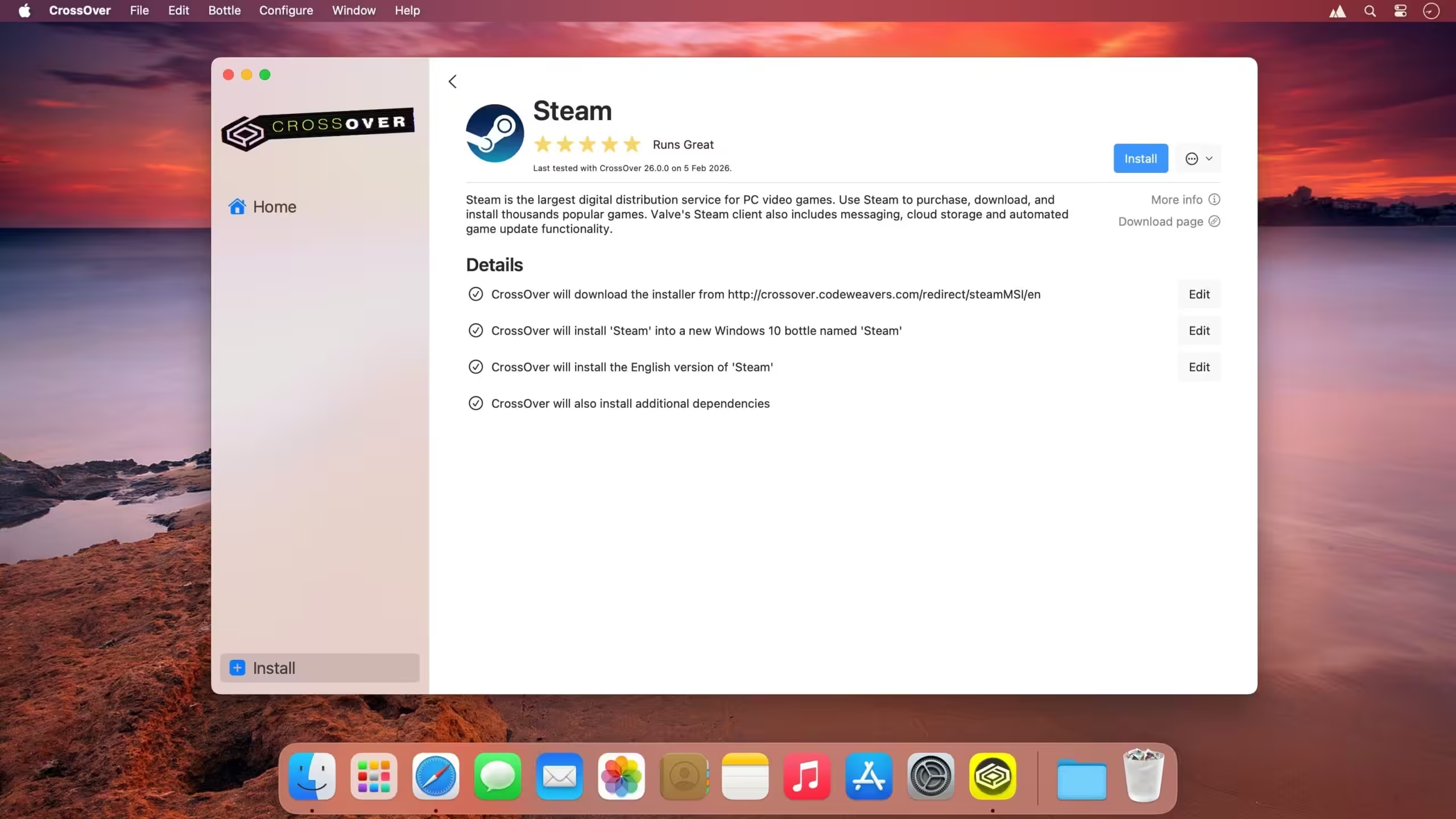
Downloading apps for installation fails, such as trying to install Steam. I’m not blocking CrossOver with anything like Little Snitch so I don’t know what the issue is. Anyone have a fix? The error says “The downloading Steam task failed. The request timed out.”
It works fine, just copy the .app and look into the Extra folder and read README.pdf
it’s work for me. thank you!
the latest crack isn’t a crack. it says 14 days trial. also the auto install doesn’t work, you need to use manual install
it is working just fine, you need to read README.pdf file in extra folder
Correct, I have also an older before not used version tested 23.6, was not working too, the same with 14 days trial
its not cracked/patched working – only 14 days demo … please update to working version
thanks
so…its working ?
Crossover 23.7 + GPTK 1.1 is out on 27.11
Crossover 23.7 is in beta
Crossover 23.7 is out
I think it works
Crack is not working
when i try to install something like steam it says that creating the bottle or unknown installer task fail, and just fails in general. If any of you know a fix please tell me.
which version?
thank you, this works. you need to make terminal have full disk accese to let the command line run
Sooooooo, what if terminal is restricted. Then what.
I have full disk access, but after launch license.tool crossover always run in trial version .
You must give Terminal, Full Disk Access in Privacy & Security settings
Working on Macbook Air M2.
Just follow the instructions in the Pdf file.
Thanks !
When I get a version of this that works I stick with it. It’s pointless to keep up-dateing it.
When I downloaded the app it still says that I only 14 days to try this out. Is there a way to fix that?
There is a extra folder it contains a file license tool.
Run it !
which one? is it rhash?
stuck at license.tool . it says waiting for RSA key but task never complete
thank u its work
When i open setup its says right click on black apple logo then click on open on context menu when I click open a pop show to give my mac password and when I enter password and click ok after that new dialog shows up saying that “An unexpected error ocurred while running the Application”
same did you figure out how to use it?
No jala el KEY !!!
is this actually cracked? it still says that i need to buy it. for now i m just using the “14 day trial” and maybe they found a loophole for me to just use the trial version
works! Mac mini m2 pro / ventura 13.4
this version is working well on MBP M1 13″. i tested with steam and gtaV. thank you guys!
V 22.1.1 runs on MBP with M2Pro Chip well.
Doesn’t work on Apple Silicon Macs.
works perfectly on 2023 16″ m2 pro MBP. well enough I purchased it after trying
It is good to buy it from the developer.
I actually did purchase it legit. I didnt have an available trial so used this as a trial. I did not however end up buying parallels. I went with this
It does work perfectly.
how tutorial to crack ?
Works finally!!!!! 😉
It works, Ventura 12.4 M1, it says 14 days demo version… ?
Works.
Still not working. IDK why it has been uploaded in the first way
not working
Version 22.0.1 full of malware and not working propertly
Any updates to 22.0.1?
I does not work for me
22.0.1 is out please update
It was working with no issues whatsoever until i upgraded to Ventura. Now i get an Initialization Failure. Failure to run Python script. Anyone know a workaround please?
https://www.reddit.com/r/macgaming/comments/v9ar2j/crossover_on_macos_ventura/
how to fix error
Crossover is crashing.. not working
same issue here im on mac m1
How is it working for you? It just crashes when I open the program. Can you please help me?? Do you have Discord I can share my screen
it is working i used it with heroic to play rocket league what amazing experience on m1 max
working
Crossover 21
wont create botttle in /System/Library/Crossover/Bottlename
its working? anyone?
You should try it.