


DaVinci Resolve Studio has been the color corrector standard in post-production since 1984. There are thousands of colorists worldwide who understand the performance, quality, and workflow of DaVinci and love it as their trusted partner in creativity. DaVinci is the name behind more feature films, television commercials, documentaries, episodic television production, and music videos than any other grading system.
- Features
- Screenshots
- Whats new?
Introducing the Cut Page!
Designed specifically for editors working on high end fast turn around work such as television commercials and even news cutting, the cut page is all about speed. It’s an alternate edit page with a streamlined interface and revolutionary new tools that will help you work faster than ever.
The cut page lets you import, edit, trim, add transitions, titles, automatically match color, mix audio and more. Whether you’re delivering for broadcast or for YouTube, the cut page has everything you need to get the job done, all in one place. Plus, the regular edit page is still available so you can switch between edit and cut pages to change editing style right in the middle of a job.
DaVinci Resolve Studio
Upgrade to DaVinci Resolve Studio for even more creative tools and options! You get a huge set of indispensable ResolveFX and FairlightFX plugins, along with support for 4K, 8K and higher resolution projects at frame rates up to 120 frames per second.
You also get the new DaVinci Neural Engine which enables features such as facial recognition, speed warp retiming, automatic color balancing and automatic color matching. DaVinci Resolve Studio also adds film grain tools, advanced noise reduction, blur and mist effects, HDR grading, 10bit H.264 support, 3D immersive audio, stereoscopic 3D support, multi user collaboration tools and more!
- DaVinci Neural Engine: The new DaVinci Neural Engine uses state-of-the-art deep neural networks and learning, along with artificial intelligence to power new features such as speed warp motion estimation for retiming, the super scale for up-scaling footage, auto color and color matching, facial recognition, and more! The DaVinci Neural Engine is entirely cross-platform and uses the latest GPU innovations for AI and deep learning to provide unparalleled performance and quality.
- New and Improved ResolveFX: DaVinci Resolve Studio 16 features major improvements to existing ResolveFX, along with several new plugins that editors and colorists will love! You get new ResolveFX plugins for adding vignettes, drop shadows, removing objects, adding analog noise and damage, chromatic aberration, stylizing video and more! There are also improvements to the scanline, beauty, face refinement, blanking fill, warper, dead pixel fixer, and colorspace transformation plugins.
- Legendary DaVinci Quality: DaVinci Resolve’s Emmy™ award-winning image processing technology features deep 32-bit float processing combined with unique, patented YRGB color science that processes luminance independent of color. This allows you to adjust the luminance of video without rebalancing the color of your highlights, mid tones, or shadows! The massive internal color space is perfect for the latest HDR and wide color gamut workflows.
- Introducing the Cut Page: Designed specifically for editors working on high end fast turn around work such as television commercials and even news cutting, the cut page is all about speed. It’s an alternate edit page with a streamlined interface and revolutionary new tools that will help you work faster than ever. The cut page lets you import, edit, trim, add transitions, titles, automatically match color, mix audio and more. Whether you’re delivering for broadcast or for YouTube, the cut page has everything you need to get the job done, all in one place. Plus, the regular edit page is still available so you can switch between edit and cut pages to change editing style right in the middle of a job.
- Blackmagic RAW: Blackmagic RAW is a new and modern codec that gives you stunning image quality and blazing fast performance in an intelligent new file format. Featuring advanced de-mosaic technology and a revolutionary intelligent design, Blackmagic RAW gives you both the quality and benefits of RAW with the speed, ease of use, and file sizes of traditional video formats.
- Hardware Control Panels: When you have a client looking over your shoulder you need to work fast. DaVinci Resolve control panels are designed to give you fluid, hands-on control over multiple parameters at the same time, allowing you to create looks that are simply impossible with a standard mouse! All controls are logically placed near your natural hand positions and are made out of the highest quality materials.
- Fairlight Professional Consoles: Fairlight mixing consoles provide high-quality controls for nearly every parameter and feature in the software. Unique user interfaces and dynamic configuration changes provide fast-to-use buttons and controls that are optimized for the task at hand allowing you to work faster with Fairlight audio than any other tool in the world. With the modular design, you can start with a larger console frame than you need and add more modules to meet the growing needs of your facility.
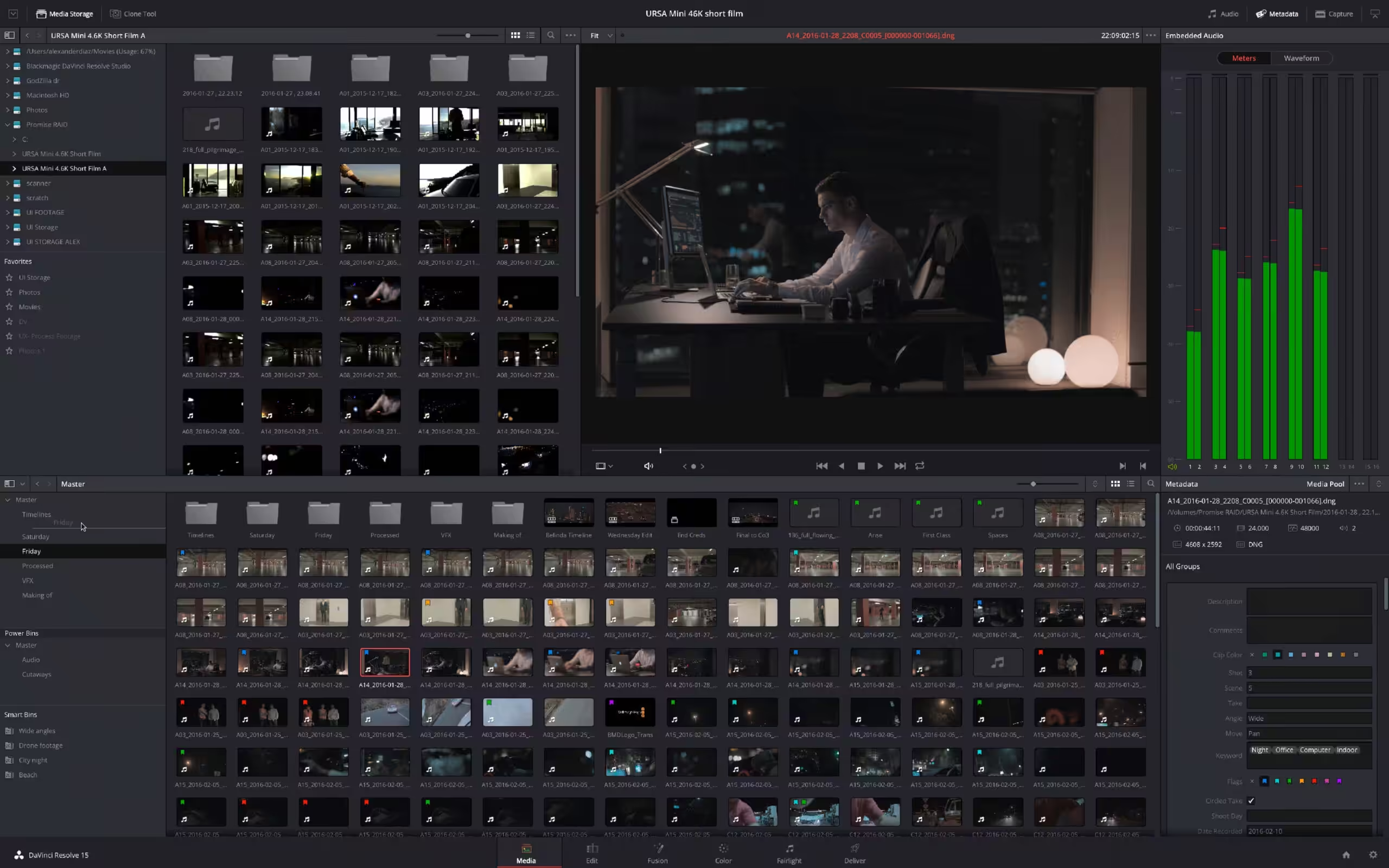
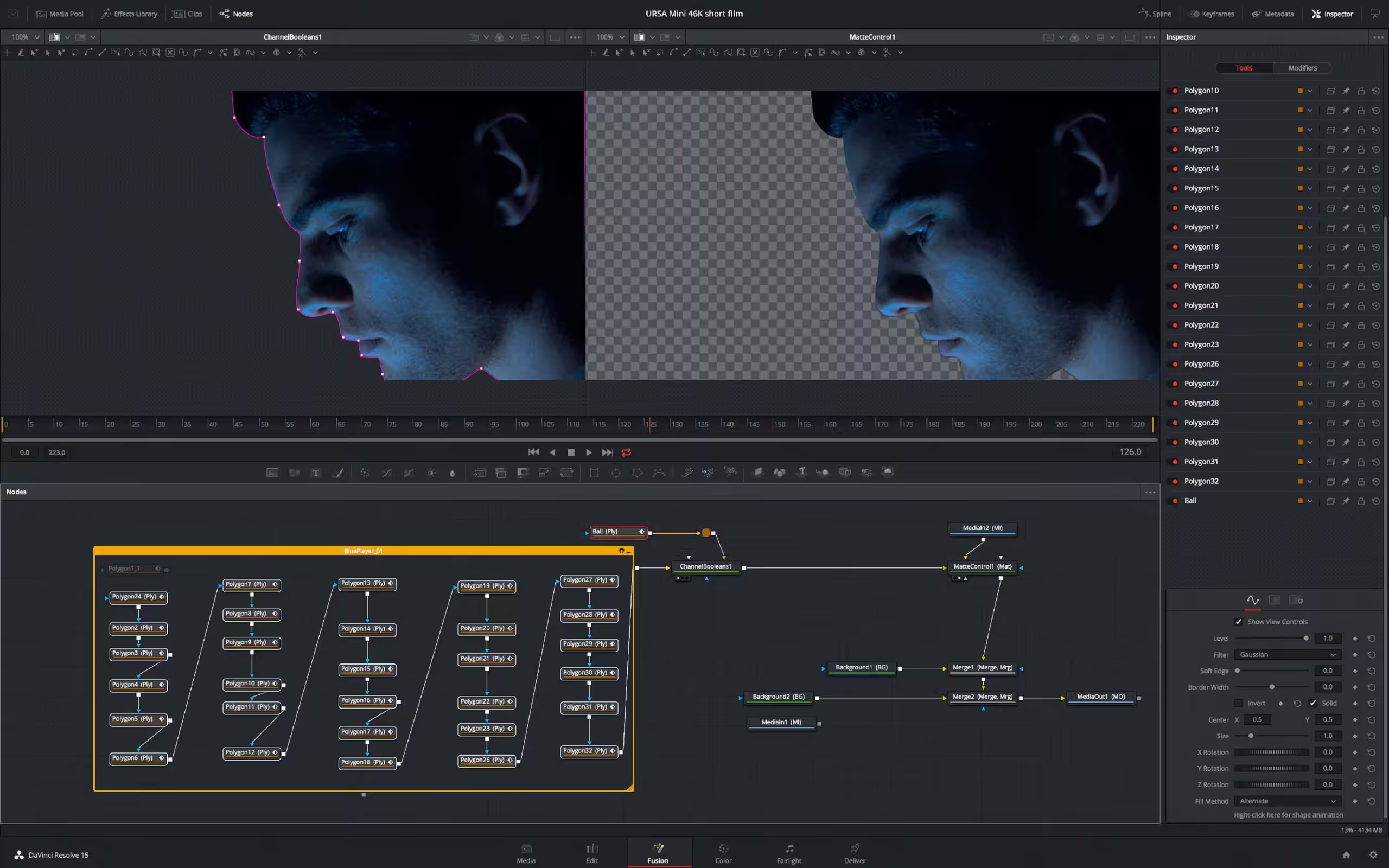
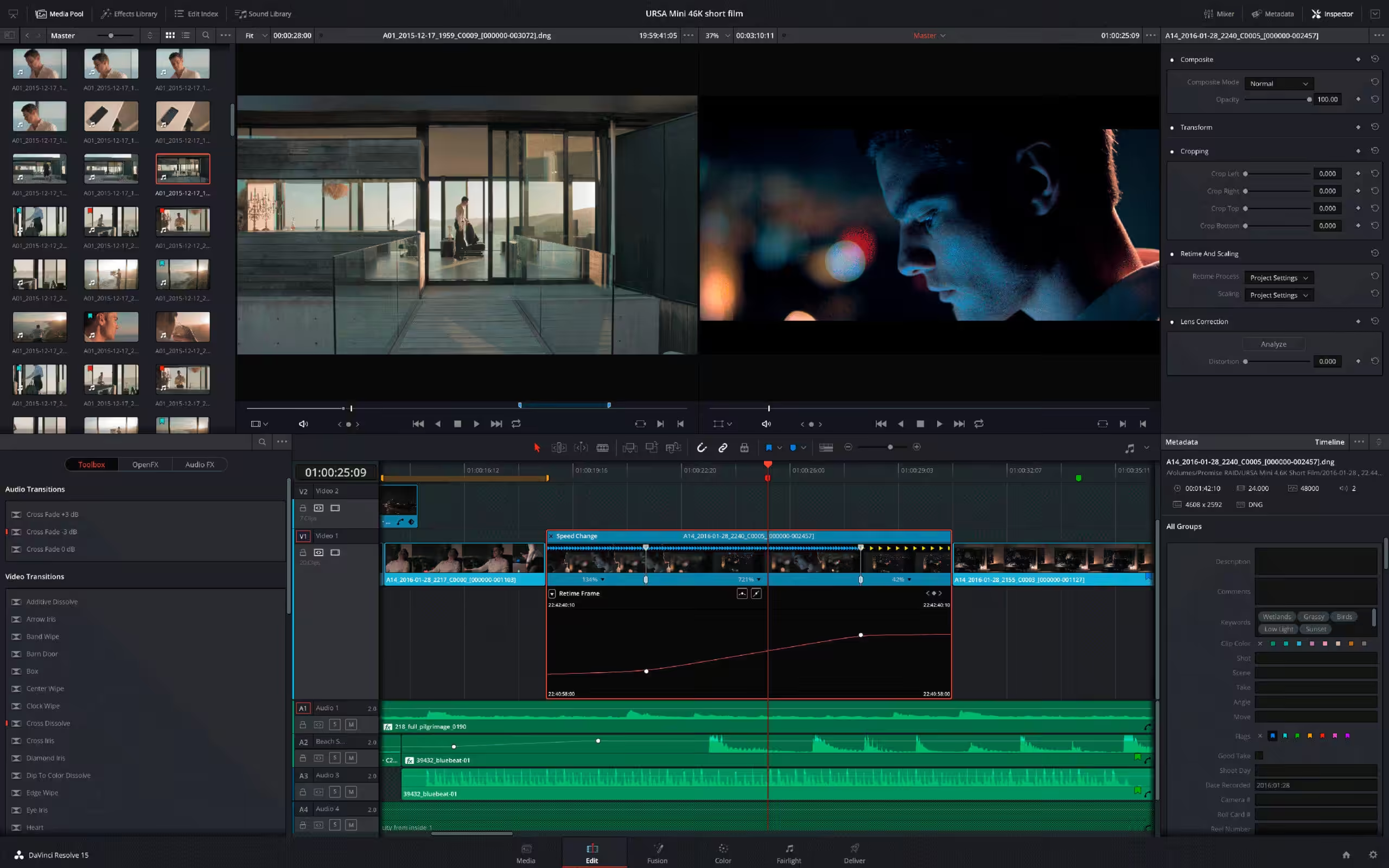
- Support for Blackmagic RAW SDK 3.6.
- New UI indicator for timelines with custom settings.
- Transcribe audio and clear transcription context menus for bins.
- New media pool column to show where the media was uploaded from.
- Scripting API support to convert a timeline to stereoscopic 3D.
- Scripting API support to create stereo clips in the media pool.
- Scripting API support to create, import, and restore cloud projects.
- Additional scripting API inputs for creating subtitles from audio.






The vl.package file is corrupted and cannot be executed.
Has anyone tried to crack FilmBox from https://videovillage.com/filmbox/ ?
Name on install page show 20.2.1, not a 20.2.2 version. Please fix it, thanks.
Links broken
Links broken
Just installed on my macbook M4, it’s crashing. When exported, the color grading is flickering to RAW to colored like wtf
it’s asking for license key to me
Yup same issue. It keeps flickering endlessly. Uninstalled this version.
Just installed on a MacMini M4 with latest OS, but it’s crashing a lot! Usable, but has crashed more than 10x in one day.
First download link is fake, second one is the right one, the third one has wrong file.
20.1 works fine without patch, read the readme text, do not apply the patch, it just deletes everything.
Just install the app it works straight away out of the box. Bravo.
All links updated
Download is 20.0.1 not 20.1
its showing – zsh: event not found: [
Working well
June 5, 2024
This file has reached maximum downloads. v19.1.4 Theuser.cloud
Sing up a free account.
share a full video
still asks for license key. so it doesnt work. sad
Just following instruction.text on patch patch
1 . Replace “Resolve” and “libfusionsystem.dylib” into DaVinci Resolve.app from main applications
DaVinci Resolve.app > Show Package Contents > Contents > MacOS
2. Type the following in terminal and hit enter and enter your mac login password if needed
license_content=”LICENSE blackmagic davinciresolvestudio $(printf “%06d” $((RANDOM % 1000000))) permanent uncounted
hostid=ANY issuer=CGP customer=CGP issued=$(LC_TIME=en_US.UTF-8 date +”%d-%b-%Y”)
akey=$(printf “%04d-%04d-%04d-%04d-%04d” $((RANDOM % 10000)) $((RANDOM % 10000)) $((RANDOM % 10000)) $((RANDOM % 10000)) $((RANDOM % 10000))) _ck=00 sig=\”00\””
sudo mkdir -p “/Library/Application Support/Blackmagic Design/DaVinci Resolve/.license”
echo “$license_content” | sudo tee “/Library/Application Support/Blackmagic Design/DaVinci Resolve/.license/blackmagic.lic” >/dev/null
3. Type the following in terminal and hit enter and enter your mac login password if needed
sudo codesign –force –deep –sign – /Applications/DaVinci\ Resolve/DaVinci\ Resolve.app/Contents/MacOS/Resolve
Works on MBP M1.
Thanks
this cracked version require key where is the key?
That is a guidance that leave a lot to be desired..
with just
*Open “Terminal” app
*⏤⏤⏤ ✥ Go inside the medicine directory.
Where is there a directory or folder called medicine with these 3 files?
no explanation whatsoever about the most crucial step and source the vital directory with the 3 files… is it hidden?.
see no folder named like that, whichever way I slice it.
If I open terminal from desktop or inside application-resolve and drop “cd DaVinci_Resolve_Studio_19.0_Mac/medicine” doesn’t seem to do jack when pasted in terminal.
just get “no such file or directory.
Most of the other guidanceson apps.. Im able to follow, but this one is so crude and lack of information on vital steps but it likely comes down to my lack of skills, using terminal.
All process is completed but when I open the software I get the pop up of licence key for studio or login to davinci cloud what to do ?
19.1.1 on M1 Sequoia works perfectly fine.
Replaced the three files and start.
what 3 files
“No such file or directory”
That’s what terminal answers….
Hello to all,
Do you have a step by step to install on mac intel with sonoma 14.5.
Thanks a lot
having trouble running the patch.sh file in terminal
it keeps saying access denied
saw the comments below, and i dont follow the part where go to medicine directory
what is it? how to open it in terminal ?
you need to just change the permission by running command in terminal
chmod 777 patch.sh
The Mounter Group Instaler is safe? For 19.6.1?
i done all this in mentioned in readme but it asking licsence
❖ Thank you so much for this DaVinci Resolve Studio 19.0.0.0069 upload.
❖ Clear steps to follow to install DaVinci Resolve Studio 19.0.0.0069 on M1 Mac(Apple Silicon):
⏤ ◉ Download this file from one of above 3 links. Go to “DaVinci_Resolve_Studio_19.0_Mac” folder.
⏤ ◉ Double click on “DaVinci_Resolve_Studio_19.0_Mac.dmg”. It will open a window with 3 icons
⏤⏤⏤ Double click on “Install Resolve 19.0.pkg”
⏤⏤⏤⏤ Introduction
⏤⏤⏤⏤⏤⏤ Continue
⏤⏤⏤⏤ Read Me
⏤⏤⏤⏤⏤⏤ Continue
⏤⏤⏤⏤ License
⏤⏤⏤⏤⏤⏤ Continue
⏤⏤⏤⏤⏤⏤⏤ Agree
⏤⏤⏤⏤ Installation Type
⏤⏤⏤⏤⏤⏤ Install
⏤⏤⏤⏤⏤⏤⏤⏤ Done
⏤ ◉ Open “iTerm” or “Terminal” app and follow below 3 steps in correct sequence:
⏤⏤⏤ ✥ Go inside the medicine directory.
⏤⏤⏤⏤⏤⏤ cd DaVinci_Resolve_Studio_19.0_Mac/medicine
⏤⏤⏤ ✥ Copy the “Resolve” file below mentioned path and make “Resolve” file executable.
⏤⏤⏤⏤⏤⏤ cp -rf Resolve “Resolve /Applications/DaVinci Resolve/DaVinci Resolve.app/Contents/MacOS”
⏤⏤⏤⏤⏤⏤ chmod +x “Resolve /Applications/DaVinci Resolve/DaVinci Resolve.app/Contents/MacOS/Resolve”
⏤⏤⏤ ✥ Now immediately run this “Resolve” file, and it would create “.license” folder which is needed for further steps.
⏤⏤⏤⏤⏤⏤ Great You’re almost there
⏤⏤⏤⏤⏤⏤⏤⏤ Quick setup
⏤⏤⏤⏤⏤⏤ Setup Project
⏤⏤⏤⏤⏤⏤⏤⏤ HD
⏤⏤⏤⏤⏤⏤⏤⏤⏤⏤1080
⏤⏤⏤⏤⏤⏤⏤⏤⏤⏤Continue
⏤⏤⏤⏤⏤⏤ Project media location
⏤⏤⏤⏤⏤⏤⏤⏤ Continue
⏤⏤⏤⏤⏤⏤ Keyboard Layout
⏤⏤⏤⏤⏤⏤⏤⏤ Davinci Resolve
⏤⏤⏤⏤⏤⏤⏤⏤⏤⏤ Continue
⏤⏤⏤⏤⏤⏤ Final step
⏤⏤⏤⏤⏤⏤⏤⏤ Activate using license window is shown (Just don’t worry and quit)
⏤⏤⏤⏤⏤⏤⏤⏤⏤⏤Quit
⏤ ◉ Copy “libfusionsystem.dylib” to Fusion directory:
⏤⏤⏤⏤ cp -rf libfusionsystem.dylib /Applications/DaVinci\ Resolve/DaVinci\ Resolve.app/Contents/Libraries/Fusion
⏤ ◉ Copy “blackmagic.lic” to “.license” folder. You will find this folder only when you run “Resolve” app and quit.
⏤⏤⏤⏤ cp -rf blackmagic.lic /Library/Application\ Support/Blackmagic\ Design/DaVinci\ Resolve/Licenses/.license
You are done. Now when you open “DaVinci Resolve” it would open and is cracked and will run fine.
Just trying to help and not spamming. Thanks.
Listen to abhi’s comment, it worked on my 2021 M1 Max.
How does commenting work?
Is it working?
❖ Thank you so much for this DaVinci Resolve Studio 19.0.0.0069 upload.
❖ Clear steps to follow to install DaVinci Resolve Studio 19.0.0.0069 on M1 Mac(Apple Silicon):
◉ Download this file from one of above 3 links. Go to “DaVinci_Resolve_Studio_19.0_Mac” folder.
◉ Double click on “DaVinci_Resolve_Studio_19.0_Mac.dmg”. It will open a window with 3 icons
✥ Double click on “Install Resolve 19.0.pkg”
🞦 Introduction
🞂 Continue
🞦 Read Me
🞂 Continue
🞦 License
🞂 Continue
🞂 Agree
🞦 Installation Type
🞂 Install
✔︎ Done
◉ Open “iTerm” or “Terminal” app and follow below 3 steps in correct sequence:
✥ Go inside the medicine directory.
cd DaVinci_Resolve_Studio_19.0_Mac/medicine
✥ Copy the “Resolve” file below mentioned path and make “Resolve” file executable.
cp -rf Resolve “Resolve /Applications/DaVinci Resolve/DaVinci Resolve.app/Contents/MacOS”
chmod +x “Resolve /Applications/DaVinci Resolve/DaVinci Resolve.app/Contents/MacOS/Resolve”
✥ Now immediately run this “Resolve” file, and it would create “.license” folder which is needed for further steps.
🞦 Great You’re almost there
🞂 Quick setup
🞦 Setup Project
🞂 HD
🞂 1080
🞂 Continue
🞦 Project media location
🞂 Continue
🞦 Keyboard Layout
🞂 Davinci Resolve
🞂 Continue
🞦 Final step
🞂 Activate using license (Just don’t worry and quit)
🞂 Quit
◉ Copy “libfusionsystem.dylib” to Fusion directory:
cp -rf libfusionsystem.dylib /Applications/DaVinci\ Resolve/DaVinci\ Resolve.app/Contents/Libraries/Fusion
◉ Copy “blackmagic.lic” to “.license” folder. You will find this folder only when you run “Resolve” app and quit.
cp -rf blackmagic.lic /Library/Application\ Support/Blackmagic\ Design/DaVinci\ Resolve/Licenses/.license
You are done. Now when you open “DaVinci Resolve” it would open and is cracked and will run fine.
Il y a quelque chose que tu ne fais pas bien.
C’est important que les applications qui sont en “Medicine” se transforment en executables (avec chmod 700 (important laisser un space après 700). Une fois que tu pressé sur enter, resolve et libfusionsytem.dylib se transforme.
Un fois que tu as les deus applications executables tu suive tous les instructions de “Medicine”.
Et ça marche!
Bonne chance!
So:
1-Open Terminal:
write: chmod 700 (important to leave a space after 700) and you drague Resolve (to Medicine): “chmod 700 Resolve” and enter
same for libfusionsytem.dylib: “chmod 700 libfusionsyteme.dylib” and enter
2-Then follow the Medicine instructions and that’s it.
The program works perfectly: color, edit and export of preprojects.
I hope I have been clear!
En español:
Tienen que abrir Termina y escribir: chmod 700 (es importante dejar un espacio luego de 700). Ahi agarrar resolve de Medicine y lo pones después de 700. Apretas enter y el resolve se va transformar (quedarà como un icono negro (de blanco a negro), es decir ya puede funcionar).
Luego haces lo mismo con libfusionsyteme.dylib
3- sigues todas la indicaciones en “Medicne”.
El programa funciona perfecto. No he tenido ningun problema.
If you are not able to open resolve 19. Then go to applications>Davinci Resolve (folder)… then right click on Davinci.. resolve file and select show package contents…. then go into contents folder > Mac os folder.
Then open terminal and type chmod +x and drag and drop the resolve file into terminal and press enter. thats it now you have made this resolve file into executable file. Now open you davinci resolve app and everything will work fine.
PS: Do this process after installation + copy and replacing the 3 files in medicine folder to correct locations.
I hope you guys find this info usefull… cheerss!!!
Thanks
Version 19 is working on my Mac Pro (2013) – Monterey.
Just need to change permission on Resolve file to be executable: chmod 700 (for libfusionsytem.dylib et Resolve)
could you please explain how to get this done?
Cela ne fonctionne pas et pourtant j’ai suivi toutes les étapes
le logiciel se lance mais me demande la licence
Can you tell me which link did you downloaded?
Version 19 is working on my Mac M1 SIP Disabled, just need to change permission on Resolve file to be executable: chmod u+x g+wx resolve
Can you explain how to do it? thanks
not woking
Is Version 19 working?
hi davanci 19 to working today
its working
The resolve in medicine folder seems not to be an executable file.
Version: 19.0.0.0069 not installing on Mac Mini M1. Followed all instructions,
Version 19 doesnt work in macbook m3
How to install 19 version?
It doesn’t work for me, can anyone help me?
please How to activate version 19 on Mac?
New one monter group is working on M1, just install and run. Bravo !
How do I get the 19 version to work on M1Mac?
I can activate version 19 on a Ryzentosh
not working
cannot make it working
Use SSS comment and tell chatgpt to fix it
it workes for me and thanks
DL Davinci Resolve Studio 18.6.1 to the laters update on official page.
1. chsh -s /bin/bash (change to bash)
2. sudo spctl –master-disable
#!/bin/bash
function hex() {
# Convertit une chaîne de caractères en sa représentation hexadécimale
local input=”$1″
if [ -z “$input” ]; then
echo “Erreur : Aucune entrée spécifiée pour la conversion hexadécimale.”
exit 1
fi
printf ‘%s’ “$input” | xxd -p
}
function replace() {
# Remplace une séquence de bytes par une autre dans un fichier
local file=”$1″
local search_pattern=”$2″
local replacement=”$3″
if [ ! -f “$file” ]; then
echo “Erreur : Le fichier ‘$file’ n’existe pas.”
exit 1
fi
sed -i.bak “s/$search_pattern/$replacement/g” “$file”
}
function prep() {
# Prépare le fichier spécifié en supprimant les attributs étendus, la quarantaine et en le signant
local file=”$1″
if [ ! -f “$file” ]; then
echo “Erreur : Le fichier ‘$file’ n’existe pas.”
exit 1
fi
sudo xattr -cr “$file” || { echo “Erreur : Impossible de supprimer les attributs étendus.” >&2; exit 1; }
sudo xattr -r -d com.apple.quarantine “$file” || { echo “Erreur : Impossible de supprimer la quarantaine.” >&2; exit 1; }
sudo codesign –force –sign – “$file” || { echo “Erreur : Impossible de signer le fichier.” >&2; exit 1; }
}
function backup_data() {
# Sauvegarde les données problématiques pour une analyse ultérieure
local problematic_data=”$1″
echo “$problematic_data” >> problematic_data.txt
}
function patch() {
local resolve_executable=”/Applications/DaVinci Resolve/DaVinci Resolve.app/Contents/MacOS/Resolve”
if [ ! -f “$resolve_executable” ]; then
local similar_files=(“/Applications/DaVinci Resolve/DaVinci Resolve.app/Contents/MacOS/”*)
local found=false
for file in “${similar_files[@]}”; do
if [[ -f “$file” ]]; then
resolve_executable=”$file”
found=true
break
fi
done
if ! $found; then
echo “Erreur : Aucun fichier exécutable de DaVinci Resolve trouvé.”
exit 1
fi
fi
local dom1=$(hex “D2E856E0030085C074”)
local sub1=$(hex “D2E856E0030085C0EB”)
local dom2=$(hex “020080D2B6F1009420040034”)
local sub2=$(hex “020080D2B6F1009420040035”)
replace “$resolve_executable” “$dom1” “$sub1”
if [ $? -ne 0 ]; then
backup_data “Impossible de remplacer la séquence de bytes $dom1 par $sub1 dans $resolve_executable.”
fi
replace “$resolve_executable” “$dom2” “$sub2”
if [ $? -ne 0 ]; then
backup_data “Impossible de remplacer la séquence de bytes $dom2 par $sub2 dans $resolve_executable.”
fi
prep “$resolve_executable”
if [ $? -ne 0 ]; then
backup_data “Impossible de préparer $resolve_executable.”
fi
}
function handle_error() {
local message=”$1″
echo “Erreur : $message” >&2
# Création d’un nouveau script amélioré
create_new_script
exit 1
}
function create_new_script() {
cat < new_script.sh
#!/bin/bash
# Ajouter ici les améliorations ou ajustements nécessaires
# Par exemple, des modifications dans la fonction de patching
# Fonction pour le patching amélioré
function patch() {
# Nouveau code de patching avec des améliorations…
}
# Exécuter le nouveau patch
patch
EOF
chmod +x new_script.sh
}
function main() {
{
patch
} || {
handle_error “Impossible de patcher DaVinci Resolve.”
}
}
main
no work yet
Could someone please upload the new code for the patch on linux, in the davinci resolve 19 version the old HEX no longer works.
Please someone to share the new codes for the patch.
请问谁能上传 linux 上补丁的新代码,在 davinci resolve 19 版本中,旧的 HEX 不再工作。
请与我们分享补丁的新代码。
Guys Don’t Worry I Will Help You, Just Run the given command in your Terminal.
sudo perl -pi -e ‘s/\xCE\x03\x00\x85\xC0\x74/\xCE\x03\x00\x85\xC0\xEB/g;’ -e ‘s/\xD2\x03\xED\x00\x94\x20\x04\x00\x34/\xD2\x03\xED\x00\x94\x20\x04\x00\x35/g’ /Applications/DaVinci\ Resolve/DaVinci\ Resolve.app/Contents/MacOS/Resolve && codesign -f -s – /Applications/DaVinci\ Resolve/DaVinci\ Resolve.app/Contents/MacOS/Resolve
and done, you are ready to use crack version.
Note if you find that this command is not working then simply follow the steps
Step 1: Go to Chatgpt.com
Step 2: Run the prompt given below on chatgpt
sudo perl -pi -e ‘s/\xCE\x03\x00\x85\xC0\x74/\xCE\x03\x00\x85\xC0\xEB/g;’ -e ‘s/\xD2\x03\xED\x00\x94\x20\x04\x00\x34/\xD2\x03\xED\x00\x94\x20\x04\x00\x35/g’ /Applications/DaVinci\ Resolve/DaVinci\ Resolve.app/Contents/MacOS/Resolve && codesign -f -s – /Applications/DaVinci\ Resolve/DaVinci\ Resolve.app/Contents/MacOS/Resolve
Step 3: Copy the command given by chatgpt and run it into your mac Terminal and here you go.
Thanks me later 🙂
sudo perl -pi -e ‘s/\xCE\x03\x00\x85\xC0\x74/\xCE\x03\x00\x85\xC0\xEB/g;’ -e ‘s/\xD2\x03\xED\x00\x94\x20\x04\x00\x34/\xD2\x03\xED\x00\x94\x20\x04\x00\x35/g’ /Applications/DaVinci\ Resolve/DaVinci\ Resolve.app/Contents/MacOS/Resolve && codesign -f -s – /Applications/DaVinci\ Resolve/DaVinci\ Resolve.app/Contents/MacOS/Resolve
That worked perfect for me:
NOTE: ****SIP**** should be deactivated:
To deactivate SIP:
1. Restart your mac in recovery mode:
For Intel: Hold down Option/Alt-Command-R or Shift-Option/Alt-Command-R to force your Mac to boot into macOS Recovery Mode
For Apple Silicon:
Hold down the power on button and you’ll be directed to the recovery mode.
From utilities, choose terminal and type the instruction below:
csrutil disable
follow the instructions .
After you’ve finished cracking davinci, you can go back and reactivate the SIP
in the terminal, type: csrutil enable
Can’t do inplace edit on /Applications/DaVinci Resolve/DaVinci Resolve.app/Contents/MacOS/Resolve: Cannot make temp name: Operation not permitted.
this is what I’m getting after using the chatgpt command
still no success
not working
-i used with no filenames on the command line, reading from STDIN.
Unrecognized character \xE2; marked by <– HERE after <– HERE near column 1 at -e line 1.
-bash: ’: command not found
Thanks for the. try, but it’s not working.
ChatGPT responds with huge text and analysis of your stuff.
There is no command for the terminal coming from chatgpt.
Better upload a text file and let us download it. Greetings
Still not working M1 Sonoma, will ever a patch work ?
This works for me 18.6.5 version (SIP Disabled):
1. chsh -s /bin/bash (change to bash)
2. sudo spctl –master-disable
3. Copy the next on terminal:
function hex() {
echo “$1” | perl -0777pe ‘s|([0-9a-zA-Z]{2}+(?![^\(]*\)))|\\x${1}|gs’
}
function replace() {
declare -r dom=$( hex $2 )
declare -r sub=$( hex $3 )
sudo perl -0777pi -e ‘BEGIN{$/=\1e8} s|’$dom’|’$sub’|gs’ “$1”
return
}
function prep() {
sudo xattr -cr “$1”
sudo xattr -r -d com.apple.quarantine “$1”
sudo codesign –force –sign – “$1”
}
function patch() {
replace “/Applications/DaVinci Resolve/DaVinci Resolve.app/Contents/MacOS/Resolve” ‘D2E856E0030085C074’ ‘D2E856E0030085C0EB’
replace “/Applications/DaVinci Resolve/DaVinci Resolve.app/Contents/MacOS/Resolve” ‘020080D2B6F1009420040034’ ‘020080D2B6F1009420040035’
}
patch prep “/Applications/DaVinci Resolve/DaVinci Resolve.app”
4. sudo spctl –master-enable
5. You’re welcome
bro it is not working in mac m1
The command with the functions results in this :
patch: **** too many file arguments
the app still opens with the request for activation-key
What could be wrong ?
can you explain where to put the command ?
like those
1. chsh -s /bin/bash (change to bash)
2. sudo spctl –master-disable
where to put those?
I understand the others you put in terminal and I know how to SIP Disabled.
Thank you in advanced.
Hi Astor,
Just open the terminal and put all the commands in the order I listed.
Just keep in mind, change in the script function the next characters:
substitute the character ” with the doble quote from your keyboard (I think is ascii dec 34 hex 22, because this comments change the characters.
substitute the character ‘ with the single one from your keyboard (I think is ascii dec 39 hex 27)
You can find this codes on ASCII – Wikipedia for reference.
Hi Dolph, I just got an iMac and am trying to crack my version of Davinci Studio. It is the first time I use this kind of devices (as I am used to Windows). I would like to know if you can show me step by step the process you followed (for beginners like me) please. I would appreciate it from the bottom of my heart. Thank you and greetings from afar.
Will a working patch ever come out ?
18.6.5 won’t open, activation key is needed, please fix it
Could you please fix Usersdrive link? It’s redirecting to somewhere else. Thanks
but honestly, it’ll be more simpler and efficient to just download an appstore app, those are one click installed. you dont have to “verify” or use terminal for it.
download Final Cut Pro bro. thats what i use to edit my videos, and it’s simplistic to drag and drop effects into it.
you gotta keep closing out the redirect tab like 2 or 3 times. the 4th time you click on the userdrive download link, it’ll take you to the page where it’ll say “click to download”
most sites do this when downloading cracked files. so if you need to, just click on the download button a few times, then the fourth time or maybe 5th time you click, it’ll direct you to the right psge. then you can close out all of the redirecting new tabs that pops up.
hope this helps you! i’ll check back and see if you got it. (:
Could you please fix Usersdrive link? Thanks
How to get this working ?
The code does not work ! M1 Sonoma
where do i get the activation key for accessing this download..
Can’t do inplace edit on /Applications/DaVinci Resolve/DaVinci Resolve.app/Contents/MacOS/Resolve: Cannot make temp name: Operation not permitted.
— WORKING ONE for 18.6.1 —
Go to “https://www.blackmagicdesign.com/support/download/cdd8d8c6ed1b4a8a818e6934a885e3fd/Mac%20OS%20X” – left corner is a butter to “just download”
Install & open Terminal
Use Code:
#!/bin/bash
function hex() {
echo “$1” | perl -0777pe ‘s|([0-9a-fA-F]{2})|\\x$1|gs’
}
function replace() {
local dom=$(hex “$2”)
local sub=$(hex “$3”)
sudo perl -0777pi -e “BEGIN{\$/=\1e8} s|$dom|$sub|gs” “$1”
}
function prep() {
sudo xattr -cr “$1”
sudo xattr -r -d com.apple.quarantine “$1”
sudo codesign –force –sign – “$1”
}
function patch() {
replace “/Applications/DaVinci Resolve/DaVinci Resolve.app/Contents/MacOS/Resolve” ‘D2E856E0030085C074’ ‘D2E856E0030085C0EB’
replace “/Applications/DaVinci Resolve/DaVinci Resolve.app/Contents/MacOS/Resolve” ‘020080D2B6F1009420040034’ ‘020080D2B6F1009420040035’
}
patch
prep “/Applications/DaVinci Resolve/DaVinci Resolve.app”
In my case it worked
(bash, disabled SIP, master disabled)
dont crack !!!!
@crackmaster i tried this code but it says “event not found”
Guys
Follow this step
-> OPEN Terminal
-> ENTER this CODE
=> sudo spctl –master-disable
-> ENTER YOUR PASSCODE
-> THEN ENTER THIS CODE
=> function hex() {
echo ”$1” | perl -0777pe ‘s|([0-9a-zA-Z]{2}+(?![^\(]*\)))|\\x${1}|gs’
}
function replace() {
declare -r dom=$( hex $2 )
declare -r sub=$( hex $3 )
sudo perl -0777pi -e ‘BEGIN{$/=\1e8} s|’$dom’|’$sub’|gs’ “$1”
return
}
function prep() {
sudo xattr -cr “$1”
sudo xattr -r -d com.apple.quarantine “$1”
sudo codesign –force –sign – “$1”
}
function patch() {
replace “/Applications/DaVinci Resolve/DaVinci Resolve.app/Contents/MacOS/Resolve” ‘DF030085C074’ ‘DF030085C0EB’
replace “/Applications/DaVinci Resolve/DaVinci Resolve.app/Contents/MacOS/Resolve” ‘D297F1009420040034’ ‘D297F1009420040035’
}
patch
prep “/Applications/DaVinci Resolve/DaVinci Resolve.app”
->IF THE PROMPT ASKING YOUR PASSCODE ENTER IT ONCE MORE
->AFTER THAT ENTER THIS CODE
=>sudo spctl –master-enable
IT WILL WORKS.
Bravooooo! It work amigo! I feel like i went to level up all my skills kudos!
Me Funciono con la version 18.6.3
Code does not working
it says event not found, please help!
It doesnt work. Please someone Help!!!
Not working, it wants an activation key. Please update this quickly, wasted about two hours searching for a solution…
please lmkif you find an solution
fucking not working in macbook pro m1, make it work easy way.
Hii all,
this one works, cracked on installation.
Enjoy!
https://vziq-my.sharepoint.com/personal/7_vziq_onmicrosoft_com/_layouts/15/onedrive.aspx?id=%2Fpersonal%2F7%5Fvziq%5Fonmicrosoft%5Fcom%2FDocuments%2FApps%2FDavinci%20Resolve%20Studio%2018%2E6%2E4%20%5BMonter%20Group%5D%2Edmg&parent=%2Fpersonal%2F7%5Fvziq%5Fonmicrosoft%5Fcom%2FDocuments%2FApps&ga=1
Bro ur link is also not opening. Can u just share the onedrive only link?
it doesn’t work for me, my mac is an m1 max Os Sonoma 14.2.1
DOESN’T work on brand new mac pro
last version works why u remove it guys
waste of time it doesn’t work it asks for the number to activate it and it’s not there
waitingg too
Anyone found the FIX? As of now the 18.6.4 is not working with any of these terminal codes.
has anyone figured out a way to make this work?? Please help me out
I’m gonna help out everyone here.
1. Download Resolve Studio 18.6.1 (doesnt work for other versions)
2. Go to Chatgpt.com, enter
—–
Fix this
function hex() {
echo ”$1” | perl -0777pe ‘s|([0-9a-zA-Z]{2}+(?![^\(]*\)))|\\x${1}|gs’
}
function replace() {
declare -r dom=$( hex $2 )
declare -r sub=$( hex $3 )
sudo perl -0777pi -e ‘BEGIN{$/=\1e8} s|’$dom’|’$sub’|gs’ “$1”
return
}
function prep() {
sudo xattr -cr “$1”
sudo xattr -r -d com.apple.quarantine “$1”
sudo codesign –force –sign – “$1”
}
function patch() {
replace “/Applications/DaVinci Resolve/DaVinci Resolve.app/Contents/MacOS/Resolve” ‘D2E856E0030085C074’ ‘D2E856E0030085C0EB’
replace “/Applications/DaVinci Resolve/DaVinci Resolve.app/Contents/MacOS/Resolve” ‘020080D2B6F1009420040034’ ‘020080D2B6F1009420040035’
}
patch
prep “/Applications/DaVinci Resolve/DaVinci Resolve.app”
—–
It will give you a script that fixes the errors, copy the code
3.Open terminal, switch to bash (google how to do that), enter
sudo -i
Then paste the code, wait like 30 seconds for it to execute
works on M3 Max.
Thanks
It worked on a M3 Pro. Thanks you!
And also the the code from above don’t work. This is the result :
-bash: ’??: command not found
-bash: ’??: command not found
-bash: gs’: command not found
Unrecognized character \xE2; marked by <– HERE after <– HERE near column 1 at -e line 1.
ChatGTP does fix it, you run it but the program still asks for the activation key… so, this isn’t working for version 18.6.4…
zsh: event not found: [
not working
I can see that this site is not able to show the right character … But you just need to use the one from the keyboard
-i used with no filenames on the command line, reading from STDIN.
Unrecognized character \xE2; marked by <– HERE after <– HERE near column 1 at -e line 1.
zsh: command not found: ’
Unrecognized character \xE2; marked by <– HERE after <– HERE near column 1 at -e line 1.
-bash: ’??: command not found
-bash: ’??: command not found
-bash: gs’: command not found
Unrecognized character \xE2; marked by <– HERE after <– HERE near column 1 at -e line 1.
Not working
To run the scripts the ‘ and ’ characters must be replaced by the right one: ‘
In any case, they are not working for this version.
NOT WORK 😢
Did you try the latest script below here?
hello please may some one help me crack this
Copy the script and paste it in terminal.
Then press enter. Your terminal should be written above ZHS.
Use this
perl -pi -e ‘s/\xE8\x86\xE3\x03\x00\x85\xC0\x74/\xE8\x86\xE3\x03\x00\x85\xC0\xEB/g;’ -e ‘s/\xD2\xA9\xF2\x00\x94\x20\x04\x00\x34/\xD2\xA9\xF2\x00\x94\x20\x04\x00\x35/g’ /Applications/DaVinci\ Resolve/DaVinci\ Resolve.app/Contents/MacOS/Resolve && codesign -f -s – /Applications/DaVinci\ Resolve/DaVinci\ Resolve.app/Contents/MacOS/Resolve
this code (corrected by Chatgpt) worked on Intel i9 running sonoma 14.2.1
Remember to switch shell to “bash”
https://www.geekbits.io/how-to-change-default-shell-in-macos-sonoma-2
perl -pi -e ‘s/\xE8\x86\xE3\x03\x00\x85\xC0\x74/\xE8\x86\xE3\x03\x00\x85\xC0\xEB/g;’ -e ‘s/\xD2\xA9\xF2\x00\x94\x20\x04\x00\x34/\xD2\xA9\xF2\x00\x94\x20\x04\x00\x35/g’ /Applications/DaVinci\ Resolve/DaVinci\ Resolve.app/Contents/MacOS/Resolve && codesign -f -s – /Applications/DaVinci\ Resolve/DaVinci\ Resolve.app/Contents/MacOS/Resolve
Just go to ChatGPT and tell him to fix it and it works, i will leave the code here anyway:
perl -pi -e ‘s/\xE8\x86\xE3\x03\x00\x85\xC0\x74/\xE8\x86\xE3\x03\x00\x85\xC0\xEB/g; s/\xD2\xA9\xF2\x00\x94\x20\x04\x00\x34/\xD2\xA9\xF2\x00\x94\x20\x04\x00\x35/g’ “/Applications/DaVinci Resolve/DaVinci Resolve.app/Contents/MacOS/Resolve” && codesign -f -s – “/Applications/DaVinci Resolve/DaVinci Resolve.app/Contents/MacOS/Resolve”
That worked for me though it gave this error “error: The specified item could not be found in the keychain.”
Remember to change the curly apostrophes (‘) to standard ones before you run the code. Including #!/bin/bash at the start and saving it as a .sh file means you don’t need to change your default shell.
[code]
#!/bin/bash
perl -pi -e ‘s/\xE8\x86\xE3\x03\x00\x85\xC0\x74/\xE8\x86\xE3\x03\x00\x85\xC0\xEB/g;’ -e ‘s/\xD2\xA9\xF2\x00\x94\x20\x04\x00\x34/\xD2\xA9\xF2\x00\x94\x20\x04\x00\x35/g’ /Applications/DaVinci\ Resolve/DaVinci\ Resolve.app/Contents/MacOS/Resolve && codesign -f -s – /Applications/DaVinci\ Resolve/DaVinci\ Resolve.app/Contents/MacOS/Resolve
[/code]
It works with version 18.6.4 Intel processor! Thanks
the script is not working
Hi, is this script for 18.6.4?
@rockstar
you posting script from 18.6.3, not 18.6.4
Only work for Intel Processor but not work Apple Silicon
18.6.4 install file posted … where is activation script or crack ???
right now is useless 🙁
perl -pi -e ‘s/\xE8\x86\xE3\x03\x00\x85\xC0\x74/\xE8\x86\xE3\x03\x00\x85\xC0\xEB/g;’ -e ‘s/\xD2\xA9\xF2\x00\x94\x20\x04\x00\x34/\xD2\xA9\xF2\x00\x94\x20\x04\x00\x35/g’ /Applications/DaVinci\ Resolve/DaVinci\ Resolve.app/Contents/MacOS/Resolve && codesign -f -s – /Applications/DaVinci\ Resolve/DaVinci\ Resolve.app/Contents/MacOS/Resolve
May you explain what this is ?
The activation code ?
A command for Terminal ?
Guitar code for a new hit ?
@rockstar
script you posted is from 18.6.3 and it will not working in 18.6.4, sorry 🙁
Not working, asks me about entering a password. Anyone have a solution
not work
DOESN’T WORK ON A MAC M1 VENTURA
USE THIS! I am on a M1 Max and this worked for me.
function hex() {
echo “$1” | perl -0777pe ‘s|([0-9a-zA-Z]{2}+(?![^\(]*\)))|\\x${1}|gs’
}
function replace() {
declare -r dom=$(hex $2)
declare -r sub=$(hex $3)
sudo perl -0777pi -e ‘BEGIN{$/=\1e8} s|’$dom’|’$sub’|gs’ “$1”
}
function prep() {
sudo xattr -cr “$1”
sudo xattr -r -d com.apple.quarantine “$1”
sudo codesign –force –sign – “$1”
}
function patch() {
replace “/Applications/DaVinci Resolve/DaVinci Resolve.app/Contents/MacOS/Resolve” ‘D2E856E0030085C074’ ‘D2E856E0030085C0EB’
replace “/Applications/DaVinci Resolve/DaVinci Resolve.app/Contents/MacOS/Resolve” ‘020080D2B6F1009420040034’ ‘020080D2B6F1009420040035’
}
patch
prep “/Applications/DaVinci Resolve/DaVinci Resolve.app”
The patch doesn’t work.
this is the result :
zsh: no such word in event
Any solution ?
I am asked for an activation key… How do I do it?
It doesn`t work. It keep asking me the code. What can I do? Please help me.
why don’t you buy the software ?
sorry…
Corriendo perfecto en Monterrey 12.6.3 con el script del texto (no otro) solo ese y funciona perfecto todo.
New version 18.6.2 is out
yep … even 18.6.3
It asks for a password in terminal
thats your own mac password
why patch not work DaVinci 18.6.2 …..Sonoma 14.4.1 and MacbookPro M2?
if I do Readme in Terminal its asking for password ? is it normal?
problem fixed, now working well
how did you solve it?
What exactly did you do?
Yes I’m Running 14.1 and no issues……
davinci work on sonoma?
yep running 14.1……
work on sonoma?
set the terminal.app default shell to bash.
bash is the macOS Mojave and older version default shell.
but macOS Catelina and newer verison. It change to zsh.
so set the shell to bash ,and run the readme.txt code.
PLEASE HOW DO I SET IT TO BASH?
Just used the following terminal command for 18.6.1 (Apple Silicon) downloaded directly from BlackMagic on a Mac Studio M2 Ultra with no issues:
function hex() {
echo ”$1” | perl -0777pe ‘s|([0-9a-zA-Z]{2}+(?![^\(]*\)))|\\x${1}|gs’
}
function replace() {
declare -r dom=$( hex $2 )
declare -r sub=$( hex $3 )
sudo perl -0777pi -e ‘BEGIN{$/=\1e8} s|’$dom’|’$sub’|gs’ “$1”
return
}
function prep() {
sudo xattr -cr “$1”
sudo xattr -r -d com.apple.quarantine “$1”
sudo codesign –force –sign – “$1”
}
function patch() {
replace “/Applications/DaVinci Resolve/DaVinci Resolve.app/Contents/MacOS/Resolve” ‘DF030085C074’ ‘DF030085C0EB’
replace “/Applications/DaVinci Resolve/DaVinci Resolve.app/Contents/MacOS/Resolve” ‘D297F1009420040034’ ‘D297F1009420040035’
}
patch
prep “/Applications/DaVinci Resolve/DaVinci Resolve.app”
I can’t get this or any of the other versions of this command to run… I keep getting:
zsh: event not found: [
and then nothing changes opening Resolve
try to change the terminal.app default shell to bash
Command has wrong formatting, here’s the proper one:
function hex() {
echo “$1” | perl -0777pe ‘s|([0-9a-zA-Z]{2}+(?![^\(]*\)))|\\x$1|gs’
}
function replace() {
declare -r dom=$(hex “$2”)
declare -r sub=$(hex “$3”)
sudo perl -0777pi -e ‘BEGIN{$/=1e8} s|'”$dom”‘|'”$sub”‘|gs’ “$1”
return
}
function prep() {
sudo xattr -cr “$1”
sudo xattr -r -d com.apple.quarantine “$1”
sudo codesign –force –sign – “$1”
}
function patch() {
replace “/Applications/DaVinci Resolve/DaVinci Resolve.app/Contents/MacOS/Resolve” ‘D2E856E0030085C074’ ‘D2E856E0030085C0EB’
replace “/Applications/DaVinci Resolve/DaVinci Resolve.app/Contents/MacOS/Resolve” ‘020080D2B6F1009420040034’ ‘020080D2B6F1009420040035’
}
patch
prep “/Applications/DaVinci Resolve/DaVinci Resolve.app”
Just copy it from here
result :
Unrecognized character \xE2; marked by <– HERE after <– HERE near column 1 at -e line 1.
-bash: ”$dom”‘|”??‘: command not found
-bash: gs’: command not found
Unrecognized character \xE2; marked by <– HERE after <– HERE near column 1 at -e line 1.
the command is not working in macbook m1 for 18.6.1
working fine for me.
How did you do with the key?
I just ran the commands from the “readme” file in the terminal and executed.
I have mac m1 pro version 18.6.2 this works too or not?
Doesn t working
Is this release 18.6.1 working now without issue ?
M1 ?
Serial-key is not included
what is the product key?
Does it work ? 18.6 released ? I think 18.5 was last lol…
Thanks it worked perfectly
I can’t extract the compressed file, I’ve tried 3 times from different sources, please take note of this.
Downloaded but doesn’t work. Don’t bother wasting your time and megabytes to download it.
Remote Monitor doesn’t work 🙁
I have downloaded and installed the newly added version 18.5.1 but it still asks for license key. What is the process for installing the crack?
dont download, It dosent work
when 18.5? :((((
What is license key, Activation key password…?
can we get 18.5?
Davinci Resolve Studio 18.5 has been released!
I follow the intruccion for the installation of the program, but the program neeed the serial number when i open the program..how i can fixed ?
Abre “Terminal” y pega esto:
perl -pi -e ‘s/\x03\x00\x85\xC0\x74\x7A\xE8/\x03\x00\x85\xC0\xEB\x7A\xE8/g;’ -e ‘s/\x20\x04\x00\x34\x61\x44\x00\x94/\x20\x04\x00\x35\x61\x44\x00\x94/g’ /Applications/DaVinci\ Resolve/DaVinci\ Resolve.app/Contents/MacOS/Resolve && codesign -f -s – /Applications/DaVinci\ Resolve/DaVinci\ Resolve.app/Contents/MacOS/Resolve
Luego le das “Enter”, esperas unos segundos y con eso ya deberia estar activado tu Davinci.
(Aprovado para la version 18.1.4)
Davinci 18.1.4 is out!
Any luck on the activation key serial box has only has fusion instructions.
not working missing cracked replacement app
Its legit. DR 18.1.2, but i have a Fairlight errors. Any fix? Thanks
Fairlight interface version in library error. Any fix?
Works well on Intel 16″ 2019 Macbook Pro with MacOS Ventura
A clear shit this is…
DaVinci Resolve Studio 18.1.2 is a FAKE!
The version is 18.1.0
how to activate it?
can you please share the 3rd line command?
Since iSerial Reader don’t work on Monterey, can someone post a serial ?
paste this line on terminal :
perl -pi -e ‘s/\x03\x00\x85\xC0\x74\x7A\xE8/\x03\x00\x85\xC0\xEB\x7A\xE8/g;’ -e ‘s/\x20\x04\x00\x34\x61\x44\x00\x94/\x20\x04\x00\x35\x61\x44\x00\x94/g’ /Applications/DaVinci\ Resolve/DaVinci\ Resolve.app/Contents/MacOS/Resolve && codesign -f -s – /Applications/DaVinci\ Resolve/DaVinci\ Resolve.app/Contents/MacOS/Resolve
Hi, I tried to paste that in terminal and it didn’t work. What exactly do I need to do
This command only works if you run the app under Rosetta, so you must enable the checkbox, not M1 compatible. Checked in my M1 Pro.
anyone know how to make this work on Mac M2?
I need an activation key
its still not working on new mac but you dont seem to care anyway
Onde esta o serial box
Lingki – Do you have a working version for mac monteray? All the versions I’ve found say to contact the developer and will not run on monteray.
can you please share the 3rd line command?
where the serial box ?
After pasting the the codes in terminal, the Appa is bouncing but does not open. Any idea?
Copy those three lines of code and paste one by one on your terminal to run them
there is no serial box in the folder. Only a readme file.
its asking to install flash player! why?
How long for version 17.3 please?
please provide serial key
You can find it in Serial Box
After installing this and trying to open it, it requests the activation code. How can this be bypassed?
You should use Serial Box
what is the password? when extracting file in the WinZip ?