


Acrobat DC with Document Cloud services is packed with all the tools you need to convert, edit, and sign PDFs. It’s just as mobile as you are. So you can start a document at work, tweak it on the train and send it for approval from your living room — seamlessly, simply, without missing a beat. It’s packed with smart tools that give you even more power to communicate. Create and edit PDF files with rich media included, share information more securely, and gather feedback more efficiently.
- Features
- Screenshots
- Whats new?
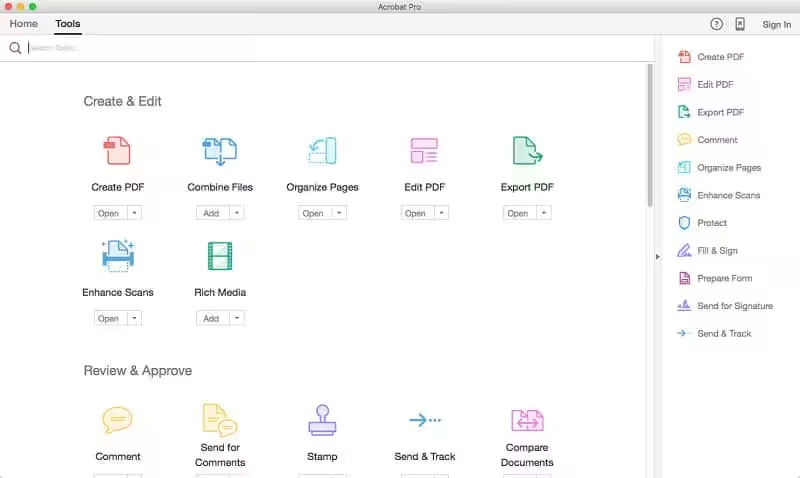
Edit PDF files
- With Adobe Acrobat Pro DC, you can make minor edits to text and images right in your PDF file without requiring the original document or graphic.
- Edit text in a PDF. Fix a typo, change a font, or add a paragraph to your PDF as easily as you do in other applications using a new point-and-click interface.
- Edit images in a PDF. Resize, replace, and adjust images in your PDF with no need to track down the original file or graphic.
Export from PDF files
- Reduce the time you spend retyping information stuck in PDF files. Convert PDF files to editable Microsoft Office documents. And save fonts, formatting, and effort.
- Convert PDF files to Word. Save your PDF as a Microsoft Word document and take your fonts, formatting, and layouts with you.
- Convert PDF files to Excel. Turn your PDF or just part of it into an editable Excel spreadsheet you can use for data analysis right away.
- Convert PDF files to PowerPoint. Get a head start on new projects by saving a PDF file as a fully editable PowerPoint presentation.
Create PDF files
- Stop worrying about whether the files you send will look right on other people’s screens. Turn documents into PDF files anyone can reliably view with free Adobe Reader.
- Convert Word, Excel, or PowerPoint to PDF. Right from your Office application in Windows, you can create PDFs, start a shared review, restrict PDF edits, and more.
- Print to PDF. Convert files to PDF from virtually any application that prints simply by selecting Adobe PDF as your printer.
- Scan to PDF. When you need to turn a paper document or form into a digital file, just scan it to create a searchable PDF file you can edit.
- Convert HTML pages to PDF. Save web pages as PDF files to archive web content, review the pages offline, or print them more reliably.
Create and analyze forms
- Cut the time you spend creating forms, rekeying data, and correcting errors. Distribute forms online, and then collect responses and analyze results in real-time.
- Create new PDF and web forms. Customize professional templates or design from scratch with the Adobe FormsCentral desktop app included in Adobe Acrobat Pro DC.
- Collect form responses with FormsCentral. Easily collect responses by moving your PDF or web forms online with the Adobe FormsCentral online service.
- Convert existing forms to fillable PDFs. Type less, gather more. Quickly convert your paper, Word, or Excel forms to fillable PDF forms.
- Collect form responses using Adobe Acrobat tools. Compile returned forms into one PDF, or host forms using a network folder or Microsoft SharePoint server.
Merge and combine files
- Communicate clearly with single PDF attachments. Put multiple files into a single, organized PDF that’s easy to email and simple to search.
- Merge multiple files into one PDF. Make sure they don’t miss a thing. Combine documents, spreadsheets, emails, and more in an organized PDF.
- Combine files in a PDF Portfolio. Share your work in a PDF Portfolio that presents materials professionally with an interactive impact.
- Create interactive PDF files. Bring your ideas to life by adding audio, Adobe Flash Player compatible video, and interactive media to PDFs.
Simplify reviews and approvals
- Stop sorting through paper and email trails. Automate review and approval cycles with Adobe Acrobat Pro DC. Multiple reviewers can see and build on each other’s comments so you can meet your deadline.
- Streamline document reviews and approvals. In shared reviews, people can annotate PDFs with familiar tools. And you can track progress and consolidate comments.
- Export comments to Word. Save all PDF comments back to the original Microsoft Word document, and update text faster than ever.
- Approve with electronic signatures. Keep projects moving. E-sign your approval right on the PDF. No need to print, fax, or mail the document.
- Get others to sign documents. Get the green light faster. Send PDFs to others for signature approval, and track them online using the Adobe EchoSign service.
- Integrate with SharePoint. With Acrobat, it’s simple and convenient for you to retrieve, open, and save PDFs stored on your company’s SharePoint server.
- Compare two file versions. Let Acrobat do the hard work of comparing two versions of a file, providing you with a detailed report of the results.
- Store and access files on Acrobat.com. Use Acrobat.com to store your files in the cloud for free, accessing them from Acrobat or Reader on your desktop or mobile device.
Protect PDF files
- Adobe Acrobat Pro DC makes it simple to keep your work more secure, no matter what application you’re in.
- Apply for PDF passwords and permissions. Get expert protection without being an expert. Add copy and edit protection to any PDF – even right from Microsoft Office applications in Windows.
- Remove and redact information. Don’t just black out confidential data. Find and get rid of it for good, even when hidden in metadata.
- Automate document security tasks. Apply document security measures the same way every time. Use a guided Action to help secure your PDF before publishing it.
- CR2: Fixed: Adobe Acrobat DC v20.012.20048 “STOP working immediately”





I dont understand how to install the last version
Por fin lo hice funcionar. Andrés, ejecuta el comando que dicen más abajo: sudo codesign –force –deep –sign – /Applications/Adobe\ Acrobat\ DC/Adobe\ Acrobat.app
Escríbelo a mano, NO LO COPIES. Y pon doble guión antes del force, deep y sign.
Lo único que no me gusta, es que siempre que ejecuto Acrobat, me sale un aviso de que esta tratando de acceder a una información almacenada en el keychain. Siempre le doy a denegar, porque no sé exactamente que está tratando de hacer, pero es un poco molesto, cada vez que se abre Acrobat, darle a denegar 2 veces :/
Hi, after a i run ADobe Zii it works for a while but after this it says continue with the trial version for 7 days. I run it again and after this it won´t open again. Do you know what´s the problem?
edit and other menus are blank
It’s broken
update please
no more working. crashing every time
Muchas gracias, 👍 funcionando en Sequoia 15.5
Funcionando macOS Sequoia
¿podrías explicarme cómo hiciste? me dice que no puede verificar el estado de mi suscripción
¿cómo hiciste para que funcionara?, me sale que debo cerrarlo porque no puede verificar el estado de mi suscripción.
Esta funcionando no macOS Sonoma em 2025?
Please, I humbly request that you upload the latest fully cracked version!!! It an essential software. Kindly do that, please!
if use this code “sudo codesign –force –deep –sign – /Applications/Adobe\ Acrobat\ DC/Adobe\ Acrobat.app”
and then the output is this
Usage: codesign -s identity [-fv*] [-o flags] [-r reqs] [-i ident] path … # sign
codesign -v [-v*] [-R=|-R ] path|[+]pid … # verify
codesign -d [options] path … # display contents
codesign -h pid … # display hosting paths
codesign –validate-constraint path … # check the supplied constraint plist
use this
“sudo codesign -f –deep -s – /Applications/Adobe\ Acrobat\ DC/Adobe\ Acrobat.app”
it works for mine, Macbook Pro M2
I have installed using the installer withing the folder, I replaced crack files, I ran the terminal line
I double click the app and nothing seems to respond
Working 100% on macOS Sequoia 15.0.1 Apple M1 Chip.
install -> Replace Crack files on path -> Execute in the terminal: sudo codesign –force –deep –sign – /Applications/Adobe\ Acrobat\ DC/Adobe\ Acrobat.app
I got it to work on Sequoia you must use the following in the terminal exactly as shown below.
sudo codesign –force –deep –sign – /Applications/Adobe\ Acrobat\ DC/Adobe\ Acrobat.app
BEWARE! It is NOT working on macOS Sequoia
its not true. agree it giving for free trail and all
looks like it is working, the same like Leo, you have to replace the files and then go to terminal and do like Leo Says.!
the Password is your own password just type it and done
What’s the password?
the patch doesnt work, please update
the patch doesnt work, asks to login
its asking for password
The patch and instructs do not work, it’s not properly patched. A trial prompt will appear and a firewall does not block it either. Should be removed from this site.
Like LEO here below said, it works.
sudo codesign –force –deep –sign – /Applications/Adobe\ Acrobat\ DC/Adobe\ Acrobat.app
mac os changes the double dash “–” for a special character and thats the reason some times does not work.
hello, i have install but no cracked I can’t edit pdf I have free version .. need help
they ar 4 easy steps to get acrobat DC working
Step by step:
1. you have to uninstall acrobat DC
2. install firewall e. g. Lulu, little snitch and configure it
3. install Adobe Acrobat DC
4 when you asked for access to the www. klick block.
Thats it
still not working
Doesn’t work.
Please post an update from the Monter Group Build.
it was working for a time but now no longer, request new version…
Please does anyone have a work around for the crack?
Any update on this? crack not working anymore.
this version not print
OK! Repost from nattyboi:
sudo codesign[space][-][-]force[space][-][-]deep[space][-][-]sign[space][-][space]/Applications/Adobe\ Acrobat\ DC/Adobe\ Acrobat.app
copy v this command into terminal, remove brackets [] using directional keys .. add ‘spaces’ using space key where instructed. hit enter, type password and whala!
MAC M1 SANOMA
omg its work for me!!!!!! Thanks
MacBook Pro 2012 13 inch
sudo codesign –force –deep –sign – /Applications/Adobe\ Acrobat\ DC/Adobe\ Acrobat.app
like this correct?
This is the error I’m getting after executing terminal command.
/Applications/Adobe Acrobat DC/Adobe Acrobat.app: replacing existing signature
/Applications/Adobe Acrobat DC/Adobe Acrobat.app: resource fork, Finder information, or similar detritus not allowed
In subcomponent: /Applications/Adobe Acrobat DC/Adobe Acrobat.app/Contents/Frameworks/AdobeAGM.framework
The app doesn’t open after this.
it woooorked, i love you thaaaaaaaaaanks <3
sudo codesign –force –deep –sign – /Applications/Adobe\ Acrobat\ DC/Adobe\ Acrobat.app
It works, but when I open Acrobat, it says 7 days trial in the bottom left corner 🙁
The code doesn’t work.
MAC M1 SANOMA 14.4 beta 4 did work
This works.
Hi , did’t work for me i tried to the app don’t want to open .
Thank you! It works!
Great Job!! Thanks.
tried and didnt work, sanoma M1
sudo codesign –force –deep –sign – /Applications/Adobe\ Acrobat\ DC/Adobe\ Acrobat.app
sudo codesign –force –deep –sign –
Dear All,
After lot of frustration I finally made it work. Rightfully said the instructions are totally incomplete. I just installed it on Macbook Pro M2 Sonoma.
1. Install the Setup.dmg ( with Wifi off )
2. Copy both files AdobeAGB and libInjectLib.dylib into the required folder as per instructions
3. Goto Terminal window and type — where you see single minus sign until the word sign . After than space and regular minus sign
sudo codesign –force –deep –sign – /Applications/Adobe\ Acrobat\ DC/Adobe\ Acrobat.app
Please note after \ Acrobat there is a space in between . Same between \ and DC and \ and Acrobat
please update adobe acrobat
Basically, it exists different dashes and we need to write specific ones in the Terminal to crack the 23.006.20320 version
For anyone having trouble cracking the 23.006.20320 version, here’s a clear explanation from someone named Ergo Sum (thank you to him):
“THIS IS CORRECT! YOU NEED TWO EN DASHES. The problem is that two EN dashes cannot be typed into these comment fields; these comment fields combine two EN dashes into a single EM dash.
You must type it like this:
sudo codesign[space][-][-]force[space][-][-]deep[space][-][-]sign[space][-][space]/Applications/Adobe\ Acrobat\ DC/Adobe\ Acrobat.app
Just remove the brackets, use EN dashes, and hit the space bar in place of “space”. Does that make sense?”
It’s september 2024 and it still works like a charm on Sonoma 14.06 on M2 Pro.
THANKS BRO WORK ON SONOMA M3 PRO
this is the one which works
sudo codesign[space][-][-]force[space][-][-]deep[space][-][-]sign[space][-][space]/Applications/Adobe\ Acrobat\ DC/Adobe\ Acrobat.app
try this one out it should work for you as-well 🙂
thank you soo much to everyone for helping me
IT WORKED! Before this I couldn’t open the app because it crashes at the startup. But now, when I open it, it says that if I want I can test it for 7 days lower left the screen. Can you please help me?
sudo codesign –force –deep –sign – /Applications/Adobe\ Acrobat\ DC/Adobe\ Acrobat.app
Password:
error: The specified item could not be found in the keychain.
Any idea what this error is related to?
sudo codesign –force –deep –sign – /Applications/Adobe\ Acrobat\ DC/Adobe\ Acrobat.app
it’s double dash in the command
It does not launch !!!! Please fix this. It was not fixed when I tried Zii either. The app without the crack is opening. So probably the setup is okay. Problem is in the crack. Please fix this.
any luck in making the app work?
i don’t understand how can i put this password. Say me that incorrect.
i use: codesign -s identity [-fv*] [-o flags] [-r reqs] [-i ident] path but is incorrect.
j have this result!!!!!
what does it mean?
Last login: Mon Oct 16 19:29:27 on ttys001
dada@iMacdiDaniele2 ~ % sudo codesign –force –deep –sign – /Applications/Adobe\ Acrobat\ DC/Adobe\ Acrobat.app
Password:
Usage: codesign -s identity [-fv*] [-o flags] [-r reqs] [-i ident] path … # sign
codesign -v [-v*] [-R=|-R ] path|[+]pid … # verify
codesign -d [options] path … # display contents
codesign -h pid … # display hosting paths
codesign –validate-constraint path … # check the supplied constraint plist
it’s double dashes, the page format combine the two double dashes (like Word).
sudo codesign [-][-]force [-][-]deep [-][-]sign – /Applications/Adobe\ Acrobat\ DC/Adobe\ Acrobat.app
remove the []
23.006.20320 is WORKING (M1/M2 Sonoma), cracking description is incomplete.
After replacing files and patch distiller you need replace the signature of the acrobat app.
The correct command to run in terminal to replace the signature is :
sudo codesign –force –deep –sign – /Applications/Adobe\ Acrobat\ DC/Adobe\ Acrobat.app
Remember it will ask for your password and the output you are looking for in the terminal is:
/Applications/Adobe Acrobat DC/Adobe Acrobat.app: replacing existing signature
Done !!! Adobe Acrobat DC 23.006.20320 is WORKING (M1/M2 Sonoma)
Blocking all internet traffic to the app using Little Snitch is also recommended.
It won’t me enter password
This is what i get. What does it mean?
Usage: codesign -s identity [-fv*] [-o flags] [-r reqs] [-i ident] path … # sign
codesign -v [-v*] [-R=|-R ] path|[+]pid … # verify
codesign -d [options] path … # display contents
codesign -h pid … # display hosting paths
codesign –validate-constraint path … # check the supplied constraint plist
23.006.20320 is WORKING (M1/M2 Sonoma), cracking description is incomplete.
After replacing files and patch distiller you need replace signature acrobat app
run terminal:
sudo codesign –force –deep –sign – /Applications/Adobe\ Acrobat\ DC/Adobe\ Acrobat.app
I did this but it still doesn’t work
Thanks for the information.
This new one works perfectly fine !
Doesn’t work on macbook M2
Dont work on macbook pro M1.
Acrobat doesn’t launch !
same MacBook Pro M1 Pro
Not working on M1 MacBook Pro, macOS Sonoma
its failed to work om mbp 2017 15 inch even after disabling sip
please update adobe acrobat
please update adobe acrobat
Abo popup is back !
https://i.ibb.co/XJdXFTv/Bildschirmfoto-2023-03-29-um-12-33-01.png
the crack is not working on MBP 13 M1
thanks a lot works perfect on MBA M1
does it work with macOs Monterey?
Not tested.
thanks a lot works perfect on MBA M1
Hi everyone.
I installed it properly, i ran zii and then i also ran lulu.
The first day it works properly but some hours later when i’m about to use it again it shows a log in app window and the app terminates.
What am i supposed to do in order for it to work properly?
Thank you!
Will the logo turn black i love the black logo!
It works perfectly on BigSur with a MacBook Air M1, thanks ! 🙂
You are most welcome Bro 🙂
,mate try to upload the latest version of it for MacOS please
use a firewall like lulu, thank me later..
It works on BigSur M1 Macs???
Yes.
How to install it??
I’m a new Mac user tell me.
You should try this: https://www.youtube.com/watch?v=XtLNCjFaktQ
or
Copy Folder “Extra” to Desktop
Launch the terminal and insert the command
chmod +x ~/Desktop/Extra/Install.app/Contents/MacOS/Install
Press enter
Thank you for the comment
Thank YOU!!, Yes I’ve tried and it worked. Thanks again
You are most welcome to Haxmac
Please keep visit and invite you firends 🙂
It was working fine wor a short time, now is showing the following message [Start your 7 day free trial of Acrobat DC.] and I don’t know how to get rid of it. Besides, as I don’t click “Buy” it quits immediately. Any idea/solution?
Please try this: Adobe Zii