

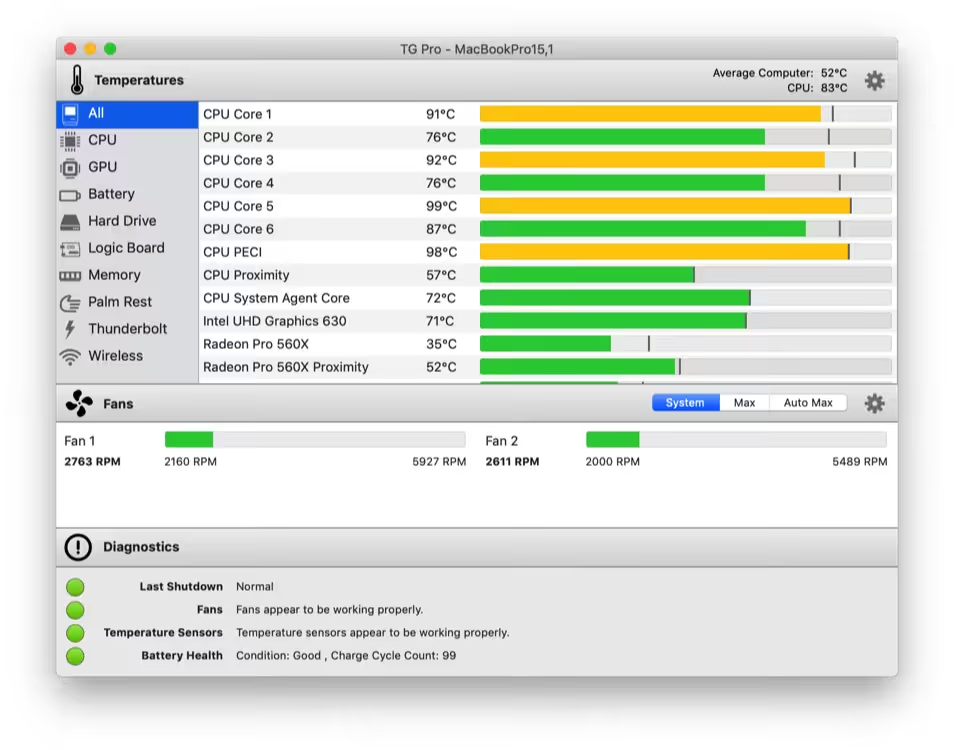
Temperature monitoring, fan control & diagnostics for all Macs. Extend the life of your Mac with TG Pro, whether you have an older iMac or a new 16-inch MacBook Pro. Quickly view CPU, GPU, logic board, or hard drive temperatures, check battery health, and other hardware diagnostics.
- Features
- Screenshots
- Whats new?
- Check up on your Mac by viewing the current and maximum recorded temperatures for every sensor. Choose between Celsius or Fahrenheit.
- Tune the fan speeds so that your Mac can run cooler with the manual fan control. Or have the fans spin at maximum speed with Auto Boost when a specific temperature is hit.
- Use the status icon to quickly check all temperatures and fans, and even control the speeds directly from the menu.
- Discover faulty fans and temperature sensors with built-in diagnostics.
- Remotely monitor servers by having emails sent instead of local notifications.

- [New] Introduced support for the latest Mac Pro (2023) M2 Ultra.
- [Fixed] Addressed an issue that caused an error message to display on macOS 13 when the ‘auto-launch on login’ option was disabled.





Does it work with Mac Mini M4 ?
version 2.98 does not work. keep saying trial period over. new authentication applied in the new version were used to recognize the hardware. help needed ? thank you
Version 2.92 Works with well with my mac m1
There is no Apple Silicon native binary. Could you please post that?
Work fine for me, m2 pro
can u add an app called Dropover? hehe thanks i love this website btw
Can you upload native version of the app? Running it through Rosetta is bit disappointing when it has arm64 release.
workds?
Works on M1 macs, fan control does not work though. All the rest is fine
Work for me on M1 Macbook Pro MacOs Monterey
it’s ok on m1 big sur
It doesnt work on M1 monterey
THATS IT IM NOT USING THIS WEBSITE EVER AGAIN AND I AM NOT GOING TO RECOMMEND IT TO ANYONE. I WILL BE DOING THE OPPOSITE AND TELLING PEOPLE TO STAY AWAY FROM IT. YOU NEVER LISTEN AND NEVER TRY TO HELP
I can confirm, after moved to application folder, it doesn’t open
STILL DOESNT OPEN UGH
doesnt open at all fix the app
not opening on m1
works with m1?
Yes.