

SoundSource lets you adjust your input, output, and sound effects devices, as well as volume settings, in mere moments, right from the menu bar. Enable soft play-through of input devices to your desired output, so you can hear the sound coming in through any microphone or other source. With SoundSource, you gain quick access to your Mac’s most crucial audio settings.
- Features
- Screenshots
- Whats new?
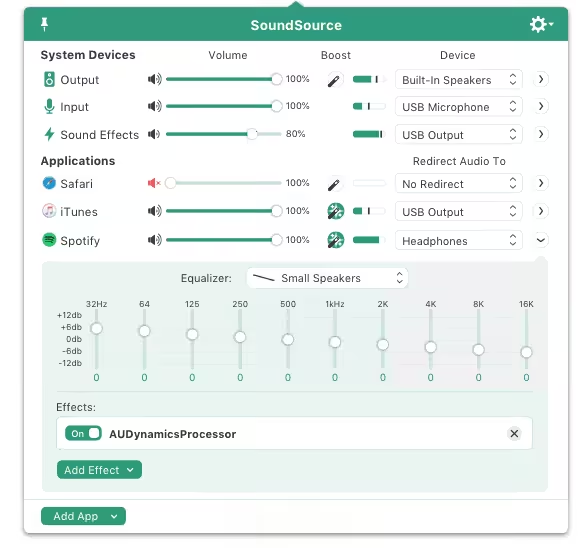
- Fast Access to System Devices: Get fast access to all the settings for your Mac’s Output, Input, and Sound Effects audio devices right from your menu bar.
- Per-Application Audio Controls: Per-app controls let you change the volume of any app relative to others, and send individual apps to different audio outputs.
- Audio Effects on Any App: Make any audio sound great, with the powerful “Magic Boost” button, renowned 10-band Lagutin equalizer, and advanced Audio Unit support.
- Magic Boost: Boost quiet audio so you can hear it, while louder audio is left untouched. Get fuller sound from even tiny MacBook speakers.
- System Audio Settings: Quickly adjust volume and input levels, balance, and even sample rate for your system’s Output, Input, and Sound Effects devices.
- System-Wide Audio Effects: Apply effects to sweeten the sound of all audio on your system, with the built-in 10-band equalizer and support for advanced Audio Unit plugins.
- Per-App Volume Control: Adjust volume levels for each of your applications, all in one place. Make one app louder or softer than others, or even mute it entirely.
- Per-App Output Redirection: Control exactly where audio plays. Route music from one app to your best speakers, while everything else is heard via your Mac’s built-in output.
- Per-App Audio Effects: Use the built-in 10-band equalizer and support for Audio Units to sweeten the sound of individual apps.
- Super Volume Keys: HDMI devices, DisplayPort monitors, and many other audio outputs fail to support the volume keys found on Mac keyboards. SoundSource makes those keys work with any outputs you have.
- Dark Mode Support: SoundSource now includes a dark theme, perfect for use with MacOS’s new Dark Mode.
- Menu Bar Volume Indicator: Swap out SoundSource’s default menu bar icon for a volume indicator, and you’ll be able to see your output volume level at a glance.
- Menu Bar Access: SoundSource lives right in your menu bar, for fast and easy access to all your essential audio controls.
- Global Keyboard Access: Set a keyboard shortcut to pull SoundSource forward, so you can control the app without even clicking the menu bar.
- Floating Access: Making frequent adjustments? Pin SoundSource’s main window to make it float on your screen for instant access.
- The Audio Capture Engine (ACE) has been updated to 11.8.3, with further improvements for even more reliable audio capture.
- The “Get Devices” Shortcut will now correctly list all available input devices.
- Piezo will no longer incorrectly appear as an input device for SoundSource. That was weird and wrong!
- A bug which could cause some Audio Unit plugins to fail to load, or crash, has been squashed.
- Software Update checks now occur only after the Welcome Window has been closed.





21/10 Its work fine on sequoia. 5.7.2 check. I had old version, when I updated on sequoia, didnt work more, I used Audio Hijack and work fine, but I like more this one, more simple. Audio Hijack is fine to, can setting more things like peak meter, EQ, etc.
trail version on mac, guess the rhash script didn’t work on m-chips
5.8.11 says trial version
Unable to install 5.8.6
it’s really version 5.8.1 and works really well on my Sequoia 15.4.1 mac
v5.7.5 is working perfecly fine on Sequoia 15.2, mad kudos to TNT teams
how did you make it work? do you have a SN?
its version 5.7.1
fake
MacOS 15 just dropped, need v5.7.0 asap
When will the MacOS 15 update be available? Any clue?
5.6.1fc4 works woth MacOS 14 Sonoma
Version 5.6.1fc4 is available in test releases, we need a crack for it.
Won’t work on MacOS 14 Sonoma for developers yet
Works fine, tanks guys. Did as @Bang Day said, install though gatekeeper
For those who have a M1 mac, you can search for the SoundSource 5.3.8 [SN] app, and install it with the SN, later you can just rename the SoundSource.app to SoundSource.app.bak and install this 5.5.1 version, and it will work.
Perfectly work on BigSur M1 Macbook pro, make sure disconnect form any internet connection and install from gatekeeper, done.
Does not work on M1
Doesn’t work on M1 Monterey. App is installed but nothing happens when opening it,
Not working on M1
Its Shows trial Mode. Any suggested Fix, on M1
seems like it doens work for mac running M1. it still says trial. it was working great on my old macbook witk intel processor, or it it big sur thats not letting it work?
Userdrive Download works fine. No issues at all.
i use the userdrive link ans it work it say thank for your purchase so it’s amazing !
There is no read me file and no code. This shit doesn’t work
Perfectly working thank you! Guys you have to open also the read me . html file of course! Here you have the code.
Not work, its trial
Use serial Box
login id or buy key send anything for checking perfactly
Application is still asking for License Activation upon installation