


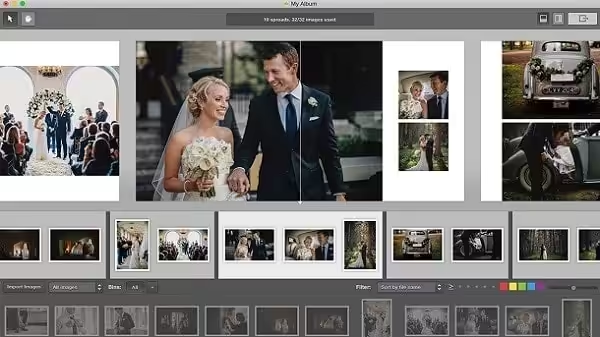
Pixellu SmartAlbums 2 album design software for photographers. Enjoy making albums. The fastest, easiest, and most intuitive album design software available. We’ve made it easy so you can get back to the things you love. This is why every single layout in SmartAlbums is handcrafted by a professional graphic artist, not a mathematical algorithm.
- Features
- Screenshots
- Whats new?
- The easiest way to design your albums: Pixellu™ SmartAlbums 2 puts thousands of professionally designed templates at your fingertips while giving you full creative freedom. Select your images, drag, and drop, and immediately see a design. It’s that simple.
- Astounding speed: Drop your images onto the Timeline and see your spreads come to life with each click. It feels magical, and yet makes perfect sense.
- Peace of mind: Forget bleeds, safe zones, and all other print jargon; Pixellu SmartAlbums has got you covered! Select from dozens of available lab company presets and rest easy knowing your album files are accurate and print-ready.
- Helpful Warnings: SmartAlbums analyzes your album and warns you of any potential issues, helping you catch problems early.
- Export to Photoshop & InDesign: Export to Adobe Photoshop and Adobe InDesign in fully layered PSD & IDML formats to seamlessly connect Pixellu SmartAlbums 2 to your current workflow.
- Template Popularity: Choose to show your top templates more often by “favoriting” them, and hide others by opting to “reject”.
- Import Formats: Import a wide range of file formats, including JPG, TIFF, PNG, and PSD.
- Gap Control: Pixellu SmartAlbums 2 enables you to be very precise with the spacing between images, ensuring gap consistency throughout the album.
- Handcrafted Templates: Human beings perceive beauty; computers don’t. This is why every single layout in Pixellu SmartAlbums 2 is handcrafted by a professional graphic artist, not a mathematical algorithm.
- Various fixes and improvements




When the program starts, it connects to the website and asks us to log in. When we log in, it gives an error. Is there a solution to this?
in the hope that one day they will be able to release a more up-to-date version for download
Links aren’t working
file was not found
work on mac sequoia , instal python 2.7.18
this software not working on mac os sequoia. please help me
Keeps crashing and quiting in macos Ventura (13.6)
M1
what a password, after sudo… terminal? key pasword, plz
Do you find the password?
Doesnt work on ventura. Python has been installed
python-2.7.18
jest install
Enjoy !
Mac Pro 2015 working?
No keeps crashing
Thankyou so much Its working 100%
I install both python and smart album but still not working :(( plz help me
Not working please help
The same on my side, i’ve tried install Python than install Smartalbum but it just crashes.
Macbook Pro M1 2020 mac os ventura
You still have a problem?
not working on m2 monterey
fix for m1 and monterey
– install python first https://www.python.org/downloads/macos/
– install pixellu smart album 2
why use python, because mac developer erase python program in macos monterey.
very helpfully work for me on macbook pro 2020 m1 monterey 512gb 16gb ram.
please help share complete guide
how to use the python?
crashing on monterey?
Work m1?
100% working.thank you so much fo the link.
Como lo has echo????