


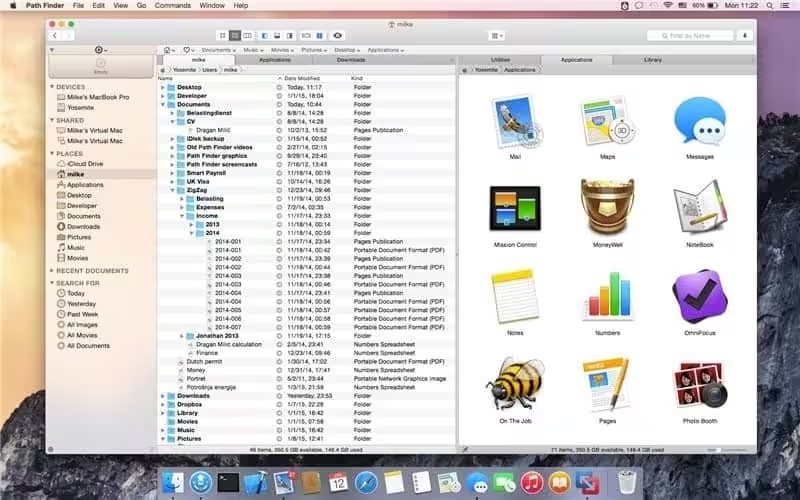
Path Finder makes you a master of file management. Take full control of your file system. Save your time: compare and synchronise folders, view hidden files, and use Dual Pane and full keyboard navigation to browse your file system. Work how you want: extreme customisation allows you to access most tools in many different ways to suit your workflow.
- Features
- Screenshots
- Whats new?
- Dropbox integration: Full Dropbox integration. Just link your account and you’re all set up
- Modules everywhere: Fully customise your browser window with our new simple drag-and-drop module system.
- FolderSync: FolderSync is Cocoatech’s Folder Comparison and Synchronisation tool. And it’s powerful.
- Folder Merging: Merge the contents of two folders when copying/moving instead of overwriting.
- Arranging and Grouping items: Arrange files in a group based on a specific file attribute.
- Editable Path Navigator: Directly type in the Path Navigator to get to your files quickly.
- One-Click Dual Pane Copy: Use Path Finder’s intuitive dual-pane browser to copy files from one pane to the next, with just a single click.
- Secure Delete: Secure delete using 1, 7, or 35 passes on any volume type.
- File Transfer Queue: Access current file operations from either a toolbar item or a separate unified window.
- ACL Editor: Create and modify Access Control Lists, an advanced alternative to macOS’s standard Unix permissions.
- Calculate File Checksums: MD2, MD4, MD5, SHA-1, SHA224, SHA-256, SHA384, SHA-512.
- File Tagging: Leverage the power of OpenMeta to tag your files and share tags between apps.
- Batch Renaming: Apply filename changes to a group of files simultaneously.
- Hex Editor: Low-level file editing without ever leaving your browser.
- Fixes empty keyboard preferences list on macOS 10.13 (High Sierra).
- Fixes secure delete on APFS volumes.






its the pirate tnt virus?
Path Finder 11.1 Cracked for macOS – Thanks.
No found for me:
————————————-
Translated Report (Full Report Below)
————————————-
Process: Path Finder [1657]
Path: /Applications/Path Finder.app/Contents/MacOS/Path Finder
Identifier: com.cocoatech.PathFinder
Version: 2211 (2211)
Code Type: ARM-64 (Native)
Role: Background
Parent Process: launchd [1]
Coalition: com.cocoatech.PathFinder [1573]
User ID: 501
Date/Time: 2026-01-20 12:31:49.7050 +0000
Launch Time: 2026-01-20 12:31:48.2156 +0000
Hardware Model: Mac14,15
OS Version: macOS 26.2 (25C56)
Release Type: User
Crash Reporter Key: 462F2BCF-B77D-D00B-328C-C6560B49B91C
Incident Identifier: 2BCF3093-3730-4D0D-9A9D-1D3DFE731742
Time Awake Since Boot: 1500 seconds
System Integrity Protection: enabled
Not working in Sonoma, kindly fix, thanks a lot.
work fine
I just download and use “Long Path Tool” to fix your error fast and easy.