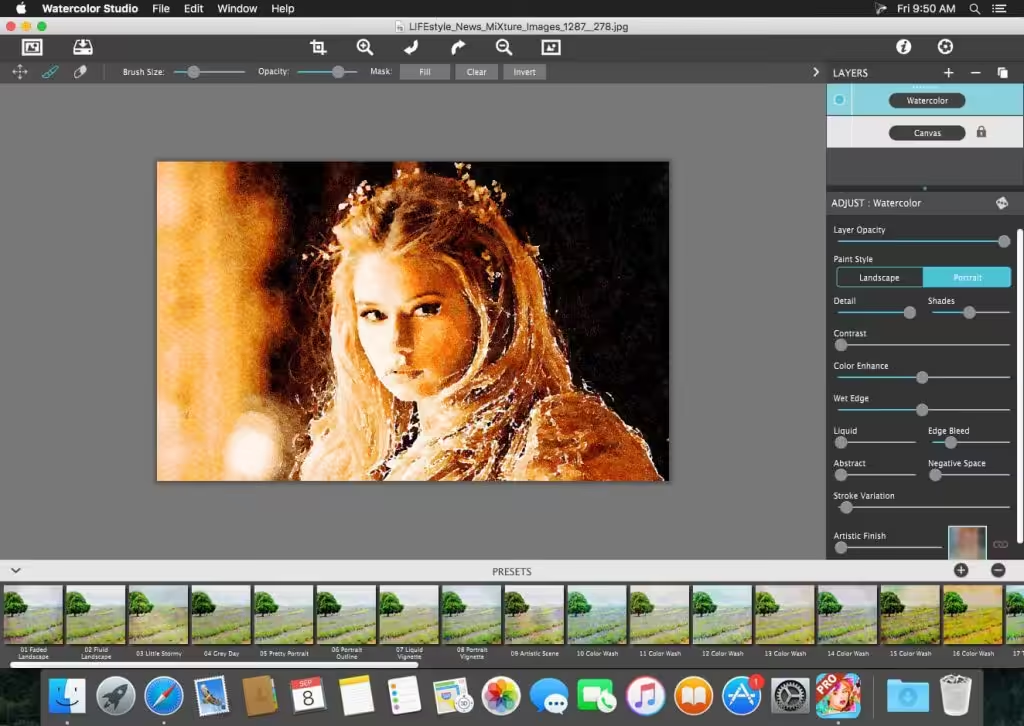
Automated Photo to Watercolor Software with Realistic and Natural Style Watercolor Studio creates fluid, liquidy, translucent watercolors with paint that flows naturally. Built on top of an incredible rendering system that uses real-world techniques, this application does the initial work, producing a watercolor instantly, then allows you to customize your paintings using an array of Sliders, Layers, Brushes, Color Washes, and Artistic finishes. The end result—print quality watercolors filled with transparent luminosity and sheer beauty.
- Features
- Screenshots
- Whats new?
- Watercolor—Portrait is a wet-on-dry painting with all the characteristics of a true watercolor. Fine-tune portrait detail and shades, then smooth color using the liquid slider while keeping contours clear and color-defined.
- Watercolor—Landscape is an abstract free flowing wet-in-wet paint style, great for landscapes. Use it to spread indiscriminate details as if saturated with water for a loose wet watercolor painting with a color that bleeds together.
- Ink Wash renders photos into soft subtle paintings, consisting of one-to-three colors. Choose from a library of washes to create ultra inky paintings or light monotone ones. Combine with Color Washes and Outline Layers for an expressive piece filled with artistic character.
- Liquefy is a transparent layer used to dilute and bleed color. Use the Liquefy Layer above one or more layers then brush with a continuous motion to blend areas where needed. This subtle effect smooths areas as a true paintbrush dipped in water.
- Outline defines edges throughout the image. Choose between round fluid watercolor strokes or sharp inked in ones. Additional modes allow you to blend the outlines into the painting naturally or create solid ones that stand out.
- Optimizations for the new M1 Macs