
Designed to make the life of app developers and designers a little bit easier, IconJar is a lightweight and user-friendly icon organizer for your Mac. In a few words, IconJar makes it as easy as possible for you to store large collections of icons under one roof and organize them efficiently, so they will always be within arm’s reach when you need them.
- Features
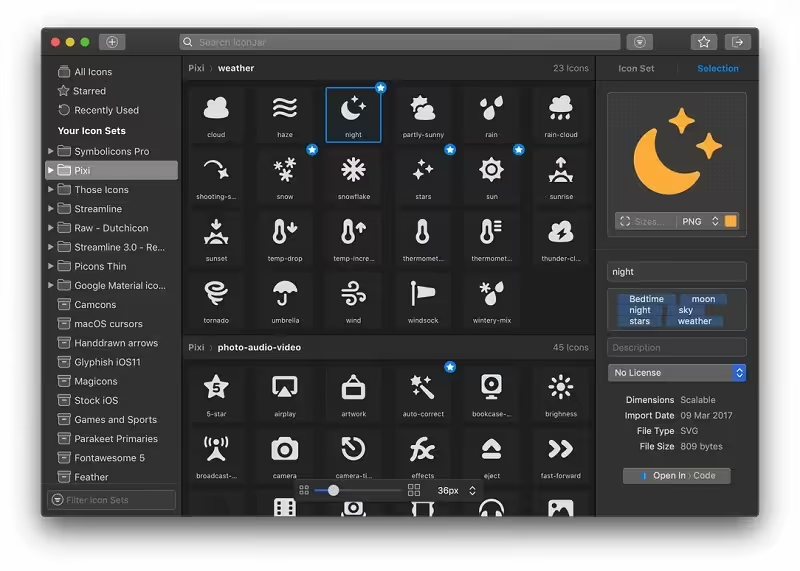
- Screenshots
- Whats new?
- Find the needle in the haystack: IconJar leaves digging through your design resources folders behind so you can use icons without the hassle. Your personal icon organizer is always just one click away and offers you everything you need to get the job done.
- Use IconJar with any app: Drag icons from IconJar into any app. You can use QuickDrag to drag and drop icons in any size, color, or various file formats on the fly.
- Export icons in the sizes you need: IconJar lets you export icons in any size, file type, and color. Save time by using one of our built-in presets for Android, iOS, macOS, or create custom presets that suit your needs.
- Bundle similar icons with Smart Sets: Smart sets are great for bundling your favorite icons or icons that share similar characteristics. Create the Smart Sets you want and IconJar will do the hard work.
- See recently used icons at a glance: IconJar automatically adds the icons you’ve used to a recently used set in the left sidebar.
- Star your favorite icons: You can now star the icons you like the most. Starred icons are all grouped in one set so you don’t have to search when you need them.
- Designed for the Mac: IconJar is designed to fit in with the apps you already use. No need to learn a fancy new thing.
- Release notes were unavailable when this listing was updated.