

DxO PhotoLab (DxO Optics Pro) provides a complete set of smart-assisted corrections that you can manually fine-tune at any time. Take control of every aspect of your photos: effectively remove noise, get rid of light constraints, recover color details, apply sophisticated optical corrections, and enhance details. You can even edit your images in Adobe Lightroom and switch back to DxO PhotoLab 3 while still maintaining an optimized workflow.
- Features
- Screenshots
- Whats new?
U POINT LOCAL ADJUSTMENT TECHNOLOGY: Perfection is just a few clicks away. Apply the local adjustments you need using U Point selection assistance technology. No need to waste your time with complicated masks. With U Point technology, your settings are automatically and intelligently applied to all similar points within the area you’ve identified.
PRIME DENOISING TECHNOLOGY
Don’t be afraid of the dark…or high ISO values. Restore the magic of a starry night, shoot at high speed even in dark conditions, and capture the intimate ambiance of a private concert with the revolutionary denoising technology PRIME. Even when you shoot with very high ISO, you can maintain the same level of detail and colors.
RAW & MUCH MORE: Image quality before everything else—that’s the DNA of DxO. Our engineers have always worked to use their technical expertise to perfect your images. Every algorithm and line of code is designed to reach a single goal—harnessing our science to help you achieve your artistic vision.
CUSTOMIZED PROFILES: Since the early 2000s, over 42,000 camera/lens combination has been scientifically analyzed in our laboratory to help you get the most out of your equipment. The resulting profiles let DxO PhotoLab automatically and effectively correct any optical flaws in YOUR equipment.
A SIMPLE AND INTUITIVE WORKFLOW
DxO PhotoLab 3 gives you access to all the tools that help you enhance your images at any step in your workflow, from retouching all the way to exporting and printing. With the many presets available and the possibility of creating your own, you no longer have to spend hours processing your photos.
Instead, you can focus all your energy on your photography. Select, sort, edit, and export your images to social networks or another program using a single intuitive interface. You can even edit your images in Adobe Lightroom and switch back to DxO PhotoLab while still maintaining an optimized workflow.
Perfection is just a few clicks away: Apply the local adjustments you need using U Point selection assistance technology. No need to waste your time with complicated masks. With U Point technology, your settings are automatically and intelligently applied to all similar points within the area you’ve identified.
PRIME DENOISING TECHNOLOGY: Don’t be afraid of the dark…or high ISO values. Restore the magic of a starry night, shoot at high speed even in dark conditions, and capture the intimate ambiance of a private concert with the revolutionary denoising technology PRIME. Even when you shoot with DxO PhotoLab very high ISO, you can maintain the same level of detail and colors.
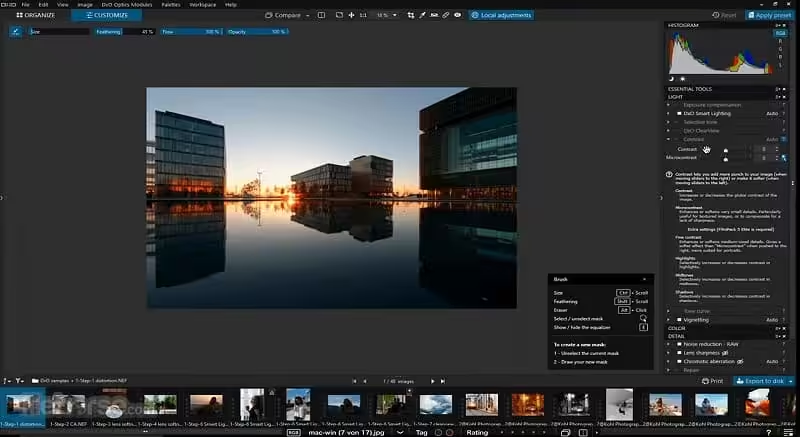
- New Soft Proofing mode: For beautiful, accurate reproduction, whatever the screen or print type. Preparing your images for different output has never been easier. Achieve accurate color at every stage of your workflow;
- New nested Projects: Organize your virtual collections of images more efficiently with the new hierarchy of Projects. Create Projects and groups of Projects and simply organize them by drag-and-drop;
- Crop tool improvement: You can now rotate your images when in Crop mode;
- Embedded Perspective tools: Perspective correction tools (keystoning) are now natively available in the ELITE
- New Color labels support: Identify, classify, and cull your images more easily with the new Color tags;
- New Exif & IPTC fields: For complete metadata management;
- New sticky headers in the source tree: The user interface of the source tree has been revamped;
- Keyword tokens improvement: Keyword tokens now show the full hierarchy if children have the same name;
- More than 77,000 camera/lens combinations are now available.




All we want is DxO FilmPack8
sorry but this release from TNT is not the elite version, it can’t open Fujifilm xtrans RAW files which means it’s only the standard version.
does it open fuji RAF files now?
August 2025 and still not the Elite version !!! Won’t open Fuji RAW.
TNT cannot crack Photolab…after 7.6…may as well just purchase.
This version has a bug in the local settings, making the pictures disappear and needing to reboot the app.
Could you please update?
PURERAW 4 please
Please, much appreciated if could you upload all the DXO software, Thank you! 🙏
BUILD 171 IS OUT
False, doesn’t work on macOS 10.11 or later
6.3.1 Has been released.
6.3 has been released
how to make it work on M1 Monterey 12, it install fine but fails to export images.
Didn´t support M1 chips