


Boom 3D is an all-new pro audio app that delivers rich and intense audio with 3D surround sound that makes any kind of headphones sound better! This premium version boasts handcrafted Equalizer Presets, advanced Audio Effects, and a toggle-friendly Intensity Slider that gives full control to the users for fine-tuning the audio to their liking.
- Features
- Screenshots
- Whats new?
3D Surround Sound:
The app comes with a patent-pending 3D Surround Sound technology that offers a mind-blowing and immersive virtual surround sound that can be experienced on ANY headphones! You will be transported into your story while the audio will flow all around you with incredible realism. It adds an extraordinary sense of depth to even the feeble notes making them BOOM with 3D!
Volume booster:
Boom 3D acts as a volume booster for Mac that takes audio levels up to deliver an enhanced audio experience. This works system-wide so that your entire Mac OS X machine produces louder, better and enhanced volume all the time!
Advanced Audio Player:
Knowing the desires of Audiophiles, Boom 3D comes with a full-fledged audio player that allows you to organize your favorite tracks into playlists and enjoy the sensational studio-quality sound, right on your Mac.
Equalizer Presets:
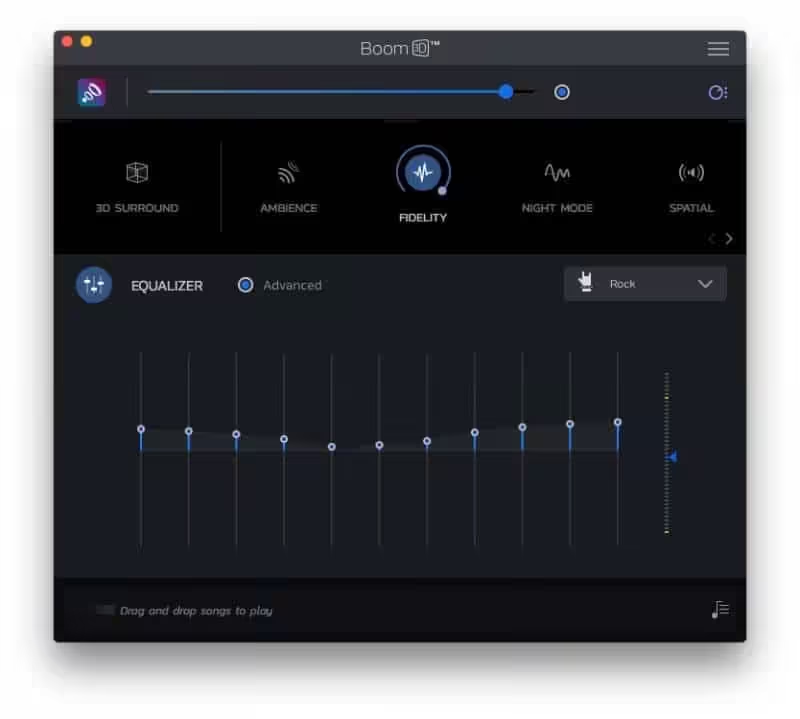
The app has been outfitted with the most advanced Equalizers that allow you to modulate your audio with just the slide of your finger. A vast array of presets has been carefully crafted to match the different genres of music so that you can simply dial into the audio to suit your moods.
20,000+ Radio Stations:
Boom 3D comes with Radio that gives you free access to more than 20,000 local and international Radio stations across 120 countries!
Apps Volume Controller:
Do you want some apps to be mute and others to a high volume? Boom 3D has an intelligent approach when it comes to controlling individual application volumes. The app has been fortified with an Application Level Volume Control that lets you control your volume centrally without the need of opening individual applications.
Controlled Boost:
Don’t worry about cranking up the volume high on your system speakers as Boom 3D comes with a Controlled Boost feature that helps you adjust the boost while keeping it in the perfect range.
Intensity Slider:
It offers full control over the audio output and allows you to adjust the Bass and Treble. Shove it up or bring it down until you spot your optimum level.
Audio Effects:
To yield a complete listening experience, Boom 3D brings in amazing audio effects that that can radically transform any kind of audio by adding an intense, unique effect and a completely new perspective.
Wireless Control
Access Boom 3D features from anywhere within your house or at work with the ‘Boom Remote’ installed on your iPhone and iPad. Control your Mac’s default volume level, and the playback controls of Spotify, VLC, QuickTime, and iTunes!
If you want to convert your Mac into an entertainment powerhouse for videos, music, movies or games, Boom 3D is a must-have!
Note: Boom 3D may not work when AirPlay and FaceTime are enabled or running on your Mac.
- We have fixed a bug that was causing excessive memory usage.
New Feature – 5.1 Multichannel Audio Support
- The latest update of Boom 3D, creates a very immersive virtual surround feel by spatialising all audio channels of a 5.1 surround audio from games, music, and movies enriching the fidelity and depth of sound for lifelike sound on any standard headphones. Spatialising different channels of surround audio track on headphones results in distinct perception of different audio channels on headphones with clarity.
- On 5.1 home theatre systems, stereo audio can now be played on all its surround speakers (multichannel output). This option can be turned on in Settings > General Preferences.





As for me, it’s worked. Let me tell how to do.
1. Download first this crack file.
2. Also download “Radio Silence” app for block internet connection. It is more better than “Little Snitch”.
3. Double click Boom 3D.dmg file and install it.
4. Next.. click and install Patch(Anti).pkg.
5. Then, go open to Radio Silence, in block application, find Boom 3D application and block it.
6. Now can safely open Boom 3D.
For those saying that’s a trial, it’s not working, try to rerun the patch .pkg. So far, it seems to work for me
Still not working, v2.2.5. It’s a 15 day trial
is just a demo fake new please don’t doing again
again not cracked! again just the demo version from the website
Fake again… It’s just a demo version…. It’s not been cracked since version 1.3.12… So sad about that…
Trial period active… I cannot found this new version for Mac
I’m sad
active notwork yet
Trial period active 🙂
Still not working: trial period active.
trial 15 dayas :c
I downloaded this, and follow the procedure to disable the SIP thingy, and install the app, it worked but after I restart the Mac. It says it’s a trial software for 15 days…. So I uninstall it and then wait for the stable software release….
trial 15 dayas
After install, It can’t be open
If someone has a problem and it doesn’t work for them, just go to facetime and deactivate it
Not working on big sur 11.4. Please do the needful. Thanks a lot.
please update, this is killer app
1.3.7 please update focus on this app this is amazing one of its kind please update asap
can you please provide the update for this app to version 1.3.7
thanks
not working on catalina 10.15.6, please update
We working on it, we honer for your comment, thank you so much 🙂
not workin new mac update 10.15.4
We working on it
Thank you for the comment 🙂
not working update fast