


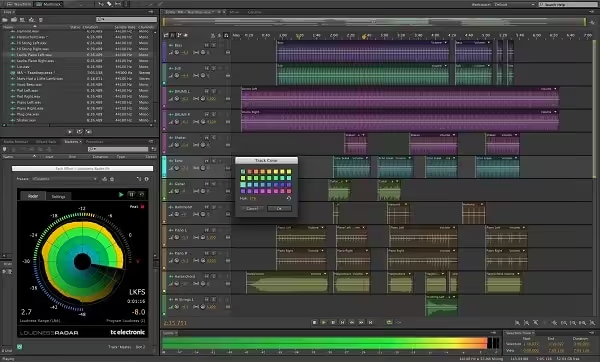
Adobe Audition 2026. A professional audio workstation. Create, mix, and design sound effects with the industry’s best digital audio editing software. Audition 2026 is a comprehensive toolset that includes multitrack, waveform, and spectral display for creating, mixing, editing, and restoring audio content.
- Features
- Screenshots
- Whats new?
- Fast, precise editing: Work quickly with dozens of timesaving audio editing features including clip grouping, edit preview, view markers for all files in the Markers panel, and more.
- Real-time clip stretching: Stretch clips nondestructively in real-time. Preview changes and settings, and render for higher quality results. Varispeed mode adjusts speed and pitch together.
- Powerful effects: Design new sounds with powerful effects including Generate Tones, Graphic Phase Shifter, Doppler Shifter, and Notch Filter.
- Powerful effects routing and VST3 support: Increase flexibility for mixing and effects channel routing. Improve third-party plug-in compatibility and open up options for new effects with VST3 compatibility.
- Tools for efficient session management: Manage sessions efficiently with the Media Browser for easy preview and import of assets, the Quick Search field in the Files panel, customizable session templates, and more.
- High-performance audio engine: Speed up audio editing with a faster audio engine, whether opening and saving files, processing multicore effects, or editing multiple sessions.
- Intuitive user interface: Enjoy an easy-to-use interface with workspace panels that dock and group for optimal organization, as well as useful phase analysis tools and a powerful Mixer panel.
- Track count limited only by CPU power: Record, edit, and mix as many stereo tracks as your CPU can handle. Resize track heights individually to focus on the tracks you need.
- Native audio effects: Apply native audio effects such as the DeHummer, DeEsser, Speech Volume Leveler, and Surround Reverb for working with 5.1 surround projects.
- Powerful sweetening tools: Fix audio problems fast with the Adaptive Noise Reduction tool and diagnostics such as the DeClicker or the Audio Healing Paintbrush for fixing audio problems visually.
- Release notes were unavailable when this listing was updated.


There is no folder called “Extra”.
The installer does not work, the system reports in the message “it is damaged and cannot be opened.”
Any recommendations or advice?
Thank you so so much, it works on apple M2, I followed the instructions on the readme file.
The instructions in the readme file are different, which one is correct?
I copied the Extra to the desktop, launched the terminal, inserted the command exactly as it is indicated (chmod +x ~/Desktop/Extra/Install.app/Contents/MacOS/Install) pressed ENTER then I get “such a directory does not exist” O_o anyone else with this issue?? Appreciate the effort though! thx ahead.
same error
can anybody help me actually i did all following steps still i don’t understand why isn’t installing
ITS WORKING ON M3 MAX
This is Arm only not Intel – please post Intel link
I have a legitimate Creative Cloud installed with the most economical plan, (photograph), how do I install this Audition without the Adobe Creative Cloud canceling me in paid adobes?
THANKS!
Paul.
Where is Folder “Extra”?
How Do You Run That Commmand Separate…?
chmod +x ~/Desktop/Extra/Install.app/Contents/MacOS/Install
First Need To Install Limited Cloud Essentials…That Need It Little Requirements Of Cloud…Later Run App From The Inside Finder /Applications/Adobe Audition.app Right Click Show Package Contents/MacOS/Run Installer Holding Down Control Left Click To Open Run Installation…Now Final Install .pkg Fix It’s Done…After Finish Installation It Ask For Connections…I Am Sure!!!!?…Needs To Be Blocked!
On Little Snitch 5.5…¿Anyway Connection? Confirm…For Me Until Now Still Work…Privacy & Security Request Permission Open Anyways Should Install.
Please help. It was running in trial mode, I ran the 6.1.7 patch and now I get a crash error “Audition quit unexpectedly” message and it won’t open the app at all 🙁 Same happened when i patched Media Encoder… I’m on a OSX 12.3 – intel mac. Thanks!
How can I change the language to Spanish?
Adobe Audition Left Corner Up Click Select Settings Languages…Select Your Language Click Save Or Done When Done Changes
Anyways Just Asking AnyOne By Any Chances Have Find Or Seen The Adobe Creative Cloud Collection MacOS 2022 v24 or v25 It Is Been Say Is The Most Stable Version Until Now 25-27GB’s .DMG
I Am Pretty Sure Is .Torrent More Safes Way To Get It…?
what do i wrong?
1. disable sip check
2. Installation nothing happen
Copy Folder “Extra” to Desktop
Launch terminal and insert the command
chmod +x ~/Desktop/Extra/Install.app/Contents/MacOS/Install
Press enter
3. fix manuel does work
using: M1 chip / Monterey
You can try.