


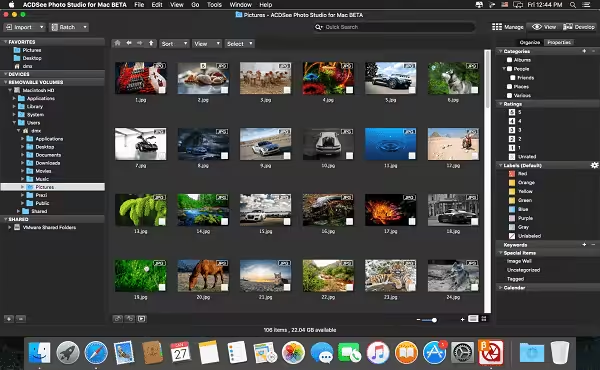
ACDSee Photo Studio offers RAW support for over 450 camera models, customizable batch presets, drag-and-drop searching, extensive digital asset management features, and a full toolkit of non-destructive adjustments, making it a strong choice for your digital photography workflow.
- Features
- Screenshots
- Whats new?
- RAW Parametric Power: Take your RAW images from rough sensor data to eye-catching digital art with a powerful RAW processing engine. With built-in RAW support, you’ll have the freedom to parametrically correct exposure, clarity, sharpness, lighting, color, noise, details, and much more.
- Control Your Collection. Make your own photography workflow rules with extensive tools for moving, finding, sorting, and sharing. ACDSee Photo Studio: Sort by date, rate images to keep track of your best work, and set categories and keywords using the method that works for you.
- Straighten it Out: Dull, blurry, crooked images are no match for ACDSee Photo Studio Here. You can draw a line across your image’s horizon, and the Straighten function will flawlessly correct its orientation to your line, ensuring it looks perfectly shot from the get-go.
- Expose Every Detail Take charge of the ACDSee Photo Studio spectrum by boosting individual colors or all tones in your images. Increase or reduce exposure, recover highlights, and add fill light, contrast, and clarity, as desired. Produce a glamorous impact on the Soft Focus tool.
- Lighten & Balance ACDSee Photo Studio Tonal range, temperature, tint, mid-tones, and highlights are all yours to command. Select the RGB color channel to adjust the entire range of the image, or select a specific color. With our patented Light EQ™ technology, you can rescue details from shadows and restore an image’s natural brightness and contrast.
- In the File List pane, the file type icon is missing if the file type is .afphoto.
- Assigning metadata via the Batch tool fails if preceded by a Move or Copy action.
- Embedding ACDSee Metadata may fail if the file type is PNG.
- When embedding ACDSee Metadata, or writing GPS or Reverse Geocode info to many files, a delay may occur before the operation begins.
- Search by EXIF Shutter Speed Value returns incorrect results. Workaround: search by EXIF Exposure Time.




version 26.0.1 shows as trial version with 0 days left
Mine opens but shows its in trial mode with zero days left, not sure if its going to stay like that indefinitely or not. Past versions usually show that the app is registered.
does not open after installation